Cart abandonment is one of the most frustrating challenges for any online store owner. You’ve done the hard work to attract shoppers, but many still leave before completing their purchases.
One common reason? Shoppers get annoyed when they have to leave the product page just to check what’s in their cart.
That’s where sliding side carts come in. They let customers easily review and manage their purchases without losing focus or interrupting their browsing flow.
For this roundup, I’ve tested the best WooCommerce sliding side cart plugins to help you find the best option to boost your sales. 📈
Quick Overview: 7 Best WooCommerce Sliding Side Cart Plugins
Before I dive into the details, here’s a quick look at the best plugins and what makes each one stand out:
| Product | Free Plan | Starting Price (/yr) | Best For | Key Feature |
|---|---|---|---|---|
| aThemes Merchant | ✅ | $79 | Stores that need built-in conversion tools | Smart cross-sells and countdown timers |
| FunnelKit Cart | ✅ | $99.50 | High-volume stores focused on order value | One-click upsells and seamless checkout flow |
| ShopEngine | ✅ | $53.10 | Elementor users who want full design control | Visual builder for custom side carts |
| Side Cart WooCommerce | ✅ | Free | Small shops that need a quick, simple setup | Real-time cart updates without page reloads |
| Fast Cart for WooCommerce | ✅ | Free | Stores that want a fast, Ajax-powered cart | Lightweight design with live updates and smooth UX |
| Side Popup Cart for WooCommerce | ❌ | $39 | Stores that need a flexible cart layout | Both popup and sliding side cart options |
| WPC Fly Cart for WooCommerce | ✅ | $29 | Stores that value style and user engagement | Beautiful animations with customizable cart bubbles |
Why Add a Sliding Side Cart to WooCommerce?
A sliding side cart lets shoppers review their items without leaving the page they are on. It makes the checkout process smoother and helps reduce cart abandonment.
Sliding side carts solve a major friction point in the shopping process. Instead of forcing customers to navigate away from product pages, they can instantly review their cart, make changes, and continue shopping. All while staying engaged with your products.
Running an online store means every small improvement in user experience can lead to more completed purchases and higher revenue.
Here are some other main benefits of using a sliding side cart:
- ⚡ Reduces page loads – Customers can view and edit cart contents instantly.
- 📈 Increases conversions – Less friction means more completed purchases.
- ⏱️ Saves time – Quick access to cart functions like quantity changes and coupon codes.
- 👔 Looks professional – Customers expect this type of smooth interaction in modern stores.
As Chris Klosowski, the president of Easy Digital Downloads, says:
A long or confusing checkout process can drive customers away. The simpler it is, the more likely shoppers are to complete their purchase – or even add more items to their cart.
Chris Klosowski, the president of Easy Digital Downloads
Most side cart plugins also offer full customization, so you can adjust colors, animations, and cart elements to match your brand without coding. Plus, you can track performance to see how these improvements impact your conversion rates.
Summing up everything, a good sliding side cart plugin can make the difference between a sale and an abandoned cart. 🛒
How I Tested and Reviewed WooCommerce Sliding Side Cart Plugins
I tested these plugins by installing each one on a live WooCommerce store and running through real shopping scenarios. I wanted to see which ones felt smooth, looked professional, and actually helped customers complete their purchases faster.
Here’s what I focused on during testing:
- Installation and setup: I installed each plugin from scratch to see how quickly I could get a working sliding cart.
- User experience: I added products, changed quantities, and applied coupons to test the overall cart flow. I also ran test purchases to see how each cart handled checkout.
- Customization options: I explored the design settings to find out how much control each plugin gives over the cart’s look and layout.
- Performance impact: I checked page load times before and after installing each plugin.
- Mobile responsiveness: I tested each cart on different devices to see how well it worked on mobile.
This approach helped me identify plugins that not only look good but actually improve the shopping experience for real customers.
Why Trust My Recommendations?
At WPBeginner, we’ve been helping WordPress users for over 16 years — and that includes countless WooCommerce store owners. Our goal is to share honest, practical advice that helps you choose tools that actually improve your store’s performance.
For this guide, I personally tested popular WooCommerce plugins on live sites to see how they perform in real shopping scenarios. I looked at design, speed, ease of use, and how well they help customers complete purchases – quickly and easily.
All my recommendations come from hands-on testing, not marketing claims. And I only include plugins I’d confidently use on my own sites or recommend to my friends and family.
You can read more about our process in our editorial guidelines.
With that said, here are my top picks:
1. AThemes Merchant
🏅 Best WooCommerce Sliding Side Cart for Conversion-Focused Stores
| Merchant Pros | ✅ Easy to use (beginner-friendly) ✅ Seamless integration with WooCommerce ✅ Boosts user experience with sleek, customizable sliding cart ✅ Offers tools for increased conversions, like recommendations and timers ✅ Broad compatibility with popular WordPress/ WooCommerce themes ✅ Includes both sliding side cart and floating mini cart |
|---|---|
| Merchant Cons |
❌ Some advanced tools are Premium-only ❌ Could be overwhelming for stores wanting just basic cart functionality |
| Pricing | Free (Lite) Premium starts from $79/year |
| Best For | Stores that want a modern, conversion-focused cart experience |
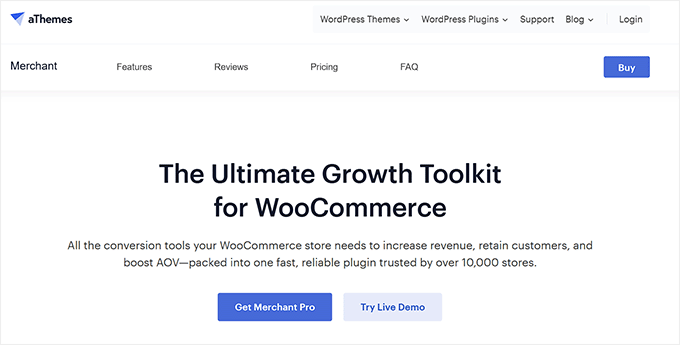
Merchant isn’t just a sliding cart plugin — it’s a full conversion toolkit. It’s ideal if you want to drive more sales using smart recommendations, countdowns, and other urgency features.
I’ve personally tested Merchant on several WooCommerce stores. The sliding cart looks great and works perfectly with tools like countdown timers and product recommendations.
My Experience
When I installed Merchant, the setup was incredibly straightforward. The interface felt intuitive, even if it was being used by someone new to WooCommerce plugins.
The plugin supports both sliding and floating cart options. So you can choose what works best for your store’s design.
During testing, I could enable the sliding side cart immediately and then customize colors and button text without any technical trouble. I also found that the plugin has over 10 different add-to-cart animations, making customization more flexible.
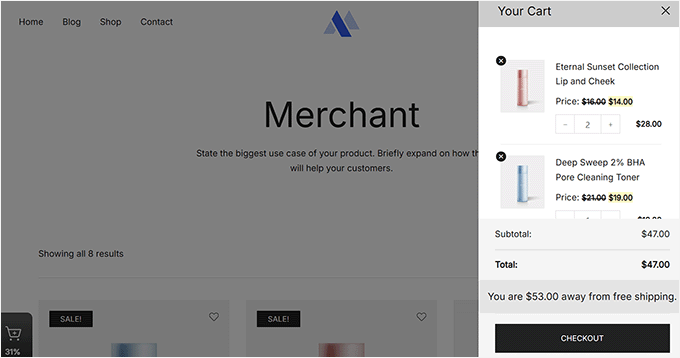
But what impressed me most were the smart cross-sell recommendations that appeared in the cart.
Unlike basic plugins that just show random products, Merchant suggested items that actually made sense with what customers had already added. This felt more like a helpful shopping assistant than pushy sales tactics.

The integrated “cart reserved” timer is another highlight, as it can help you create urgency without being annoying. When customers add items, a countdown appears showing how long their cart will be held.
The only downside I noticed was that some advanced tools, like product recommendations and complete design options, require the Pro plan.
🧑💻 Why I recommend Merchant: Overall, Merchant is a good fit for stores that want more than just a basic sliding cart. This plugin combines cart functionality with proven conversion tools to increase sales.
2. FunnelKit Cart
🏅 Best WooCommerce Sliding Side Cart for High-Volume Stores
| Pros of FunnelKit Cart |
✅ One-click upsells increase order value ✅ Built-in coupon and discount options ✅ Handles high-volume store traffic ✅ Pre-built checkout templates save time |
|---|---|
| Cons of FunnelKit Cart |
❌ Initial setup to integrate upsells effectively can take time ❌ May have too many features for smaller stores |
| Pricing | Free (Lite) Pro starts at $99.5/year |
| Best For | High-volume WooCommerce stores focused on boosting sales through upsells and streamlined checkout |
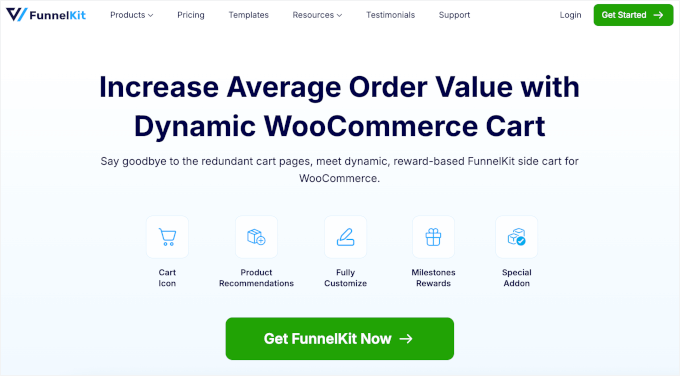
FunnelKit Cart is built specifically for stores that want to maximize revenue through strategic upselling. It’s especially useful for high-volume stores aiming to increase their average order values.
Some people I know who manage busy WooCommerce stores have mentioned that FunnelKit Cart has made a noticeable difference for them. They’ve pointed out features like the quick upsells and smoother checkout process as helpful for increasing their sales.
For this roundup, I’m putting those claims to the test.
My Experience
When I set up the side cart, the pre-built checkout templates saved a lot of time. Instead of starting from scratch, I just picked a layout and adjusted it to fit my store’s design.
Then, I tried the built-in discount and coupon tools, which made it easy to offer incentives right inside the cart. I could add free shipping, gift options, and promo codes without leaving the setup screen.
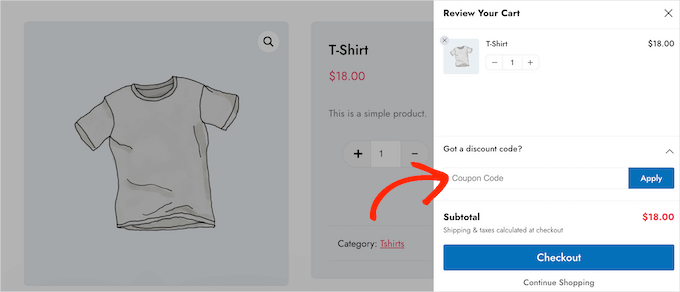
I liked how customizable the side cart drawer was, too.
I could tweak slide animations, layout, size, and colors to match my store’s look, and everything felt clean and professional.
Plus, the one-click upsells really stood out. When customers added items to their cart, relevant product suggestions appeared with quick ‘Add to Cart’ buttons.

The side cart also worked beautifully on mobile. When I tested it out, it felt smooth and responsive on phones, tablets, and desktops.
The only downside was that setting up upsell rules took a bit longer than with simpler cart plugins, especially if you want to add several product recommendations.
Why I Recommend FunnelKit Cart: In summary, FunnelKit Cart is perfect for growing stores focused on making more sales. The upselling features actually work to increase order values.
3. ShopEngine WooCommerce Builder for Elementor
🏅 Best for Elementor Users
| Pros of ShopEngine |
✅ Full integration with Elementor page builder ✅ 40+ pre-made WooCommerce templates included ✅ Complete visual customization without coding ✅ Modular cart elements you can enable or disable |
|---|---|
| Cons of ShopEngine | ❌ Only works with Elementor ❌ Can feel bloated if you only need a side cart (since it’s a complete WooCommerce builder module) |
| Pricing | Free (Lite) Pro starts at $53.1/year |
| Best For | Elementor users who want to create custom side carts and complete WooCommerce layouts without coding |
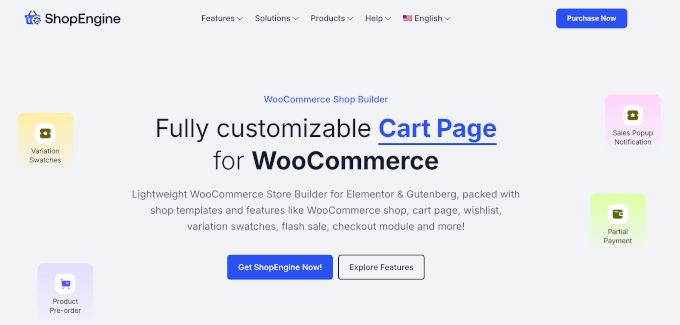
ShopEngine is perfect for anyone already using Elementor (a popular drag-and-drop page builder) who wants complete design control over their sliding cart. It goes beyond basic cart functionality to offer full WooCommerce customization.
My Experience
While testing this plugin, the modular side cart system impressed me right away. I could easily turn individual elements on or off, like cart totals or checkout buttons, with just a few clicks.
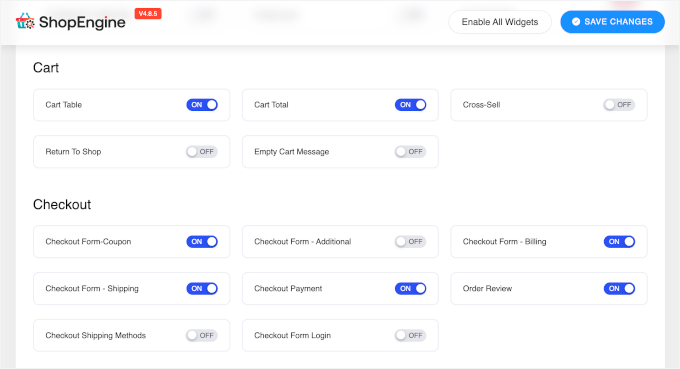
Plus, I found that the integration with both Elementor and WooCommerce felt natural.
All the tools I already knew were right there, working exactly as expected. The drag-and-drop cart builder made it easy to rearrange elements like buttons, text, spacing, and more.
The 40+ pre-made WooCommerce templates were a huge bonus. They included ready-to-use layouts for product pages, carts, and checkout flows that looked clean and professional from the start.

I also liked the built-in Elementor widgets for flash sale countdowns and cross-sell promos. They worked smoothly within the cart, so I could add urgency and boost sales without installing extra plugins.
The only drawback? If you’re not using Elementor, you won’t get as much value out of this plugin.
Why I Recommend ShopEngine: Put simply, ShopEngine is perfect for Elementor users who want complete design freedom. It turns cart customization into a visual design process rather than a technical configuration.
4. Side Cart WooCommerce
🏅 Best for Simple Projects
| Pros of Side Cart WooCommerce | ✅ Setup takes just a few clicks ✅ Works smoothly with any theme ✅ Real-time cart updates without page loads ✅ Lightweight design doesn’t slow down sites |
|---|---|
| Cons of Side Cart WooCommerce |
❌ Focuses only on basic cart functionality ❌ No built-in upselling or marketing features in the free version |
| Pricing | Free (Lite) Pro starts at $29/year |
| Best For | Small projects that need a quick-to-setup floating cart |
Side Cart WooCommerce focuses on doing one thing really well: adding a clean, functional sliding cart without any complexity. It’s ideal for smaller stores that need basic cart functionality up and running fast.
I tried out this plugin for a smaller project, and it was refreshingly simple. Setup only took a few clicks, and it instantly added a clean side cart drawer that works smoothly with any WordPress theme.
My Experience
During testing, setup was quick and straightforward. I could choose between different sliding side cart styles (cards and rows) right from the settings. Both looked clean and professional without needing extra tweaks.
Customization was also simple. I could adjust cart icon, colors, button text, and widget positions in just a few minutes, with settings that felt intuitive and not overwhelming.
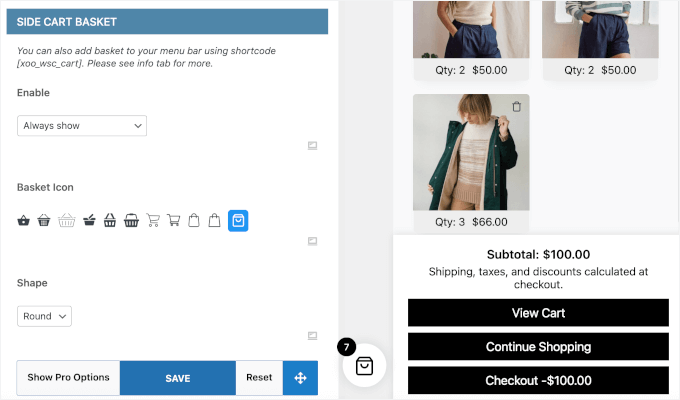
I also appreciated the custom URL option, which let me redirect customers after checkout. I usually do this for sending them to confirmation, thank-you pages, or special offers, which then makes conversion tracking a lot easier.
Real-time cart updates also worked flawlessly. Any time I added or removed products, the cart refreshed instantly without reloading the page.
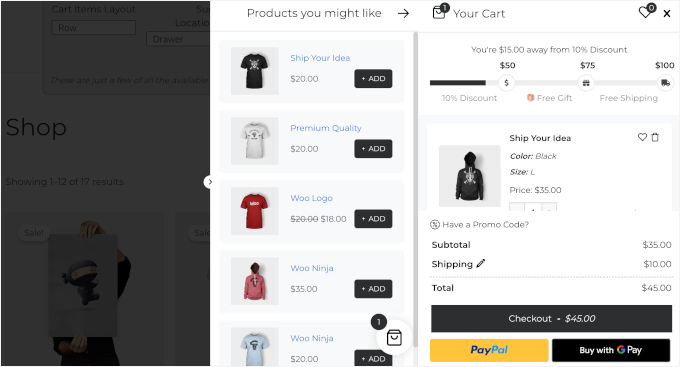
The only downside is that the free plan doesn’t include advanced tools like product recommendations or built-in marketing features. It keeps things simple and focuses purely on core cart functionality.
Why I Recommend Side Cart WooCommerce: The bottom line is that Side Cart WooCommerce works great for straightforward needs. Setup is incredibly fast and simple, and it delivers exactly what most stores need without extra complexity.
5. Fast Cart for WooCommerce
🏅 Best Free WooCommerce Sliding Side Cart
| Pros of Fast Cart for WooCommerce |
✅ Completely free with no premium version ✅ Ajax-powered cart updates without page reloads ✅ Light/dark mode design options ✅ Mobile-responsive on all devices |
|---|---|
| Cons of Fast Cart for WooCommerce |
❌ Focuses mainly on cart interaction ❌ No advanced marketing tools like upselling ❌ Limited compared to premium alternatives |
| Pricing | Free |
| Best For | A free, user-friendly, Ajax-powered floating cart that makes checkout smoother |
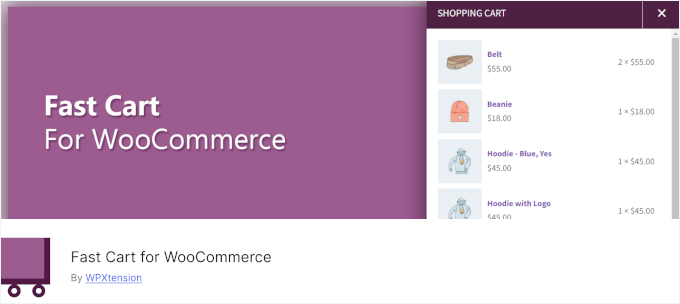
Fast Cart for WooCommerce excels at creating smooth, interactive cart experiences without customers having to reload the page. It works best for stores that want professional cart functionality without any cost.
My Experience
When I tested Fast Cart for WooCommerce, what stood out was the sleek, Ajax-powered side cart. Ajax technology allows the cart to update instantly without reloading the entire page, creating a much smoother shopping experience.
This can keep the whole shopping experience smooth and seamless.
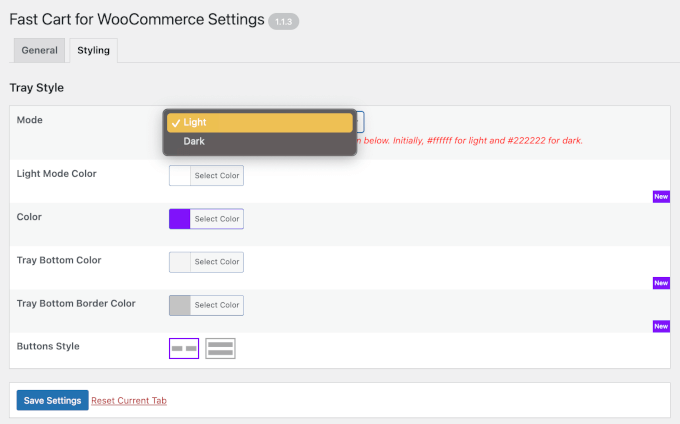
For a completely free plugin, the design flexibility was impressive. I could switch between light and dark modes, adjust colors, and customize buttons to fit different store themes. Most free tools keep customization pretty limited, but this one felt surprisingly polished.
Mobile performance was just as solid. The cart adapted automatically to phones and tablets, so I didn’t have to set up separate mobile configurations.
Unlike premium plugins that offer marketing extras, Fast Cart for WooCommerce focuses on doing one thing: providing a clean, reliable cart experience without any unnecessary clutter.
Why I Recommend Fast Cart for WooCommerce: Overall, Fast Cart for WooCommerce works well for stores that prioritize smooth cart interaction. It’s completely free, works beautifully, and the Ajax functionality makes shopping feel modern.
6. Side Popup Cart for WooCommerce
🏅 Best for Real-Time Updates
| Pros of Side Popup Cart for WooCommerce |
✅ Both side and popup cart options available ✅ Real-time cart updates keep shoppers informed ✅ Easy color and button customization ✅ Lightweight build doesn’t slow down sites |
|---|---|
| Cons of Side Popup Cart for WooCommerce |
❌ Setup options can feel overwhelming initially ❌ Premium pricing for what’s offered |
| Pricing | Starts at $39/year |
| Best For | Store owners looking for a lightweight, responsive cart solution with real-time updates |
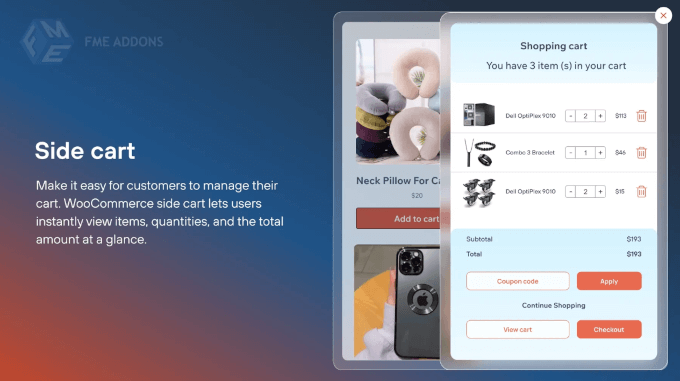
Side Popup Cart for WooCommerce gives you flexibility with both sliding side carts and popup options. It’s ideal for stores that want to show customers engaging, real-time updates without sacrificing site speed.
My Experience
When I first set up the plugin, I liked that it offered both a sliding side cart and a popup cart option.
That gave me the flexibility to choose the layout that best fit my store’s design.
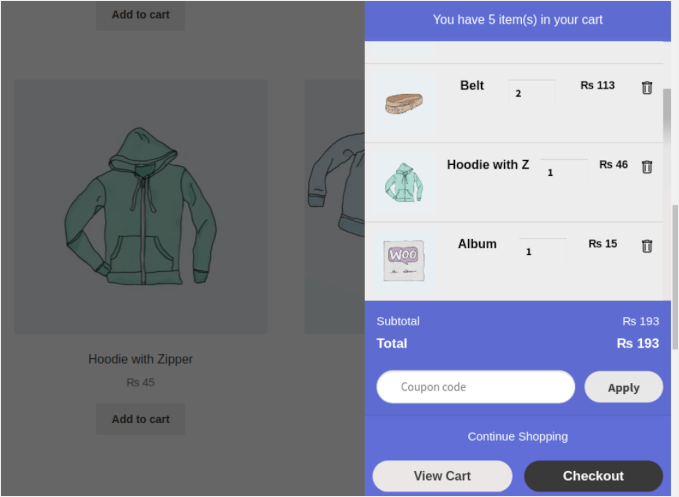
Real-time cart updates worked flawlessly. When customers added or removed items, everything refreshed instantly without reloading the page.
Customization was straightforward. I could adjust colors, button text, and widget placement to match my store’s branding, all without touching a line of code.
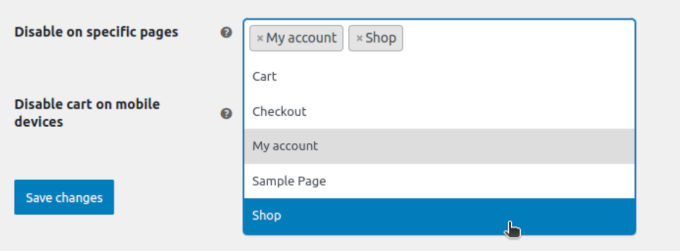
I also appreciated the option to hide the cart on certain pages. It helped keep landing pages and checkout flows clean and focused without unnecessary distractions.
Custom redirect URLs were a nice bonus, too. After checkout, I could send customers to thank-you pages or special offers, which helped improve the overall flow.
However, the variety of features and customization options can feel overwhelming during initial setup, especially if you just want basic cart functionality.
Why I Recommend Side Popup Cart for WooCommerce: In short, Side Popup Cart for WooCommerce works well for stores prioritizing performance and engagement. It delivers modern cart features while keeping your site fast and responsive.
7. WPC Fly Cart for WooCommerce
🏅 Best for Visual Appeal and Smooth Animations

| Pros of WPC Fly Cart for WooCommerce |
✅ Smooth animations and Ajax-powered experience ✅ 16+ different bubble icon types available ✅ 5+ predefined cart skins with color customization ✅ Integrates easily with most store layouts |
|---|---|
| Cons of WPC Fly Cart for WooCommerce |
❌ Essential features like instant checkout, shipping totals, and coupon support require the premium version ❌ One-time payment may feel expensive for small stores |
| Pricing | Starts at $29 |
| Best For | Creating an engaging visual experience with smooth animations and flexible design options |
WPC Fly Cart prioritizes visual appeal and smooth user interactions above everything else. It’s designed for store owners who want their cart to feel polished and engaging, with plenty of design options to match any brand aesthetic.
My Experience
After setup, the smooth sliding animations immediately caught my attention. Unlike basic carts that appear and disappear, the WPC Fly Cart moved with fluid transitions that felt polished.
In fact, the visual quality reminded me of premium eCommerce sites rather than smaller WordPress stores.
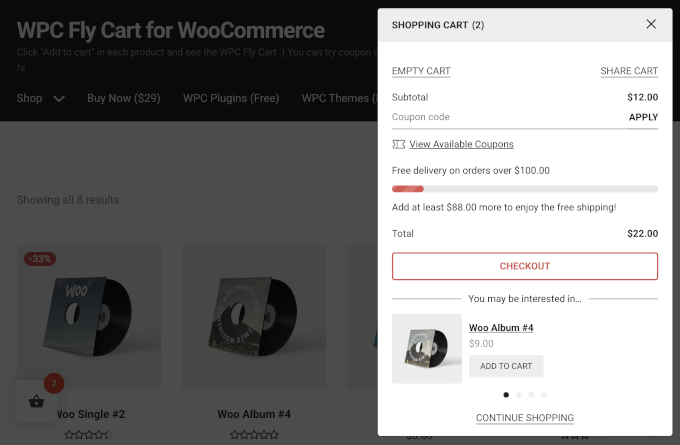
The design flexibility was another big plus. I could choose from over 16 bubble icons, several cart skins, and different display styles — from solid colors to image backgrounds. It made it easy to match the cart to my store’s look.
I also liked how much control I had over the cart’s details. It let me decide what to show: totals, subtotals, buttons, or product information, so customers only saw what they needed.
You can also enable suggested products for upsell and cross-sells. If you want to add the comparison or wishlist feature, you can do that, too.

Additionally, this plugin worked perfectly with all WooCommerce product types, including simple, variable, and grouped items.
One key limitation is that WPC Fly Cart restricts some eCommerce features, such as instant checkout, the shipping calculator, and coupon functionality, to the premium version.
Why I Recommend WPC Fly Cart for WooCommerce: WPC Fly Cart is best for stores where design quality and user experience matter most. However, keep in mind that features such as instant checkout, a cart total calculator, and coupon options are only available in the premium version.
Alternatives: Other WooCommerce Sliding Side Cart Plugins I Tested
Here are a few more plugins that I tested for this review.
Caddy
 |
🟢 Good: Clean slide-out cart with upsells and “save for later.” Free version supports product recommendations and basic styling. 🔴 Bad: Advanced features like save lists and analytics require the premium plan. ⭐ Best For: Stores that want a simple cart with light sales-boosting tools. |
XT Floating Cart for WooCommerce
 |
🟢 Good: Smooth animations, live updates, and full design control. Includes a free shipping bar and a coupon field. 🔴 Bad: Pro plan can be pricey for small stores, and some users note CSS issues with custom themes. ⭐ Best For: Stores wanting a modern shopping experience with slide-out effects. |
Addonify Floating Cart for WooCommerce
 |
🟢 Good: Free, responsive, and lightweight. Includes live updates and the Undo functionality for removed items. 🔴 Bad: Lacks advanced marketing tools and design presets. ⭐ Best For: Beginners who need a simple, reliable slide-out cart. |
CartPops
 |
🟢 Good: Elegant fly-out cart with product recommendations and a free shipping progress bar. Great for upsells. 🔴 Bad: Advanced triggers and analytics need the Pro plan. Slightly heavier on page load. ⭐ Best For: Stores aiming to boost order value with upsells and gamified checkout. |
Cart All in One
 |
🟢 Good: Full-featured sidebar cart with one-click checkout, coupons, and Ajax updates. Easy to customize. 🔴 Bad: Can feel cluttered with too many options; limited translation support. ⭐ Best For: Stores wanting an all-in-one cart, checkout, and sticky add-to-cart plugin. |
Mini Floating Cart for WooCommerce
 |
🟢 Good: Customizable mini cart with layout options and smooth animations. Works well on all devices. 🔴 Bad: Limited integrations and marketing tools. ⭐ Best For: Small shops wanting a clean, distraction-free cart that fits any theme. |
Which Is the Best WooCommerce Sliding Side Cart Plugin?
For most online stores, Merchant is the best option. It has a clean, modern design and handy features like cross-sell suggestions and countdown timers. These features are great for improving both the shopping experience and your sales.
If you run a larger store and want to boost your average order value, FunnelKit Cart is a solid pick. It includes one-click upsells and a smoother checkout process.
And if you’re using Elementor, ShopEngine gives you full design control with its visual builder.
The best option to get started? I recommend Merchant’s free version to see how a sliding side cart helps your store. Later on, you can upgrade or try other options as your business grows.
FAQs About WooCommerce Sliding Side Cart Plugins
Got questions about using a sliding side cart in your WooCommerce store? Here are some quick answers to help you out.
Why isn’t my side cart updating automatically when items are added?
This usually happens when your theme or another plugin conflicts with the side cart script. Try clearing your site cache or disabling plugins one by one to find the cause. You can also check if AJAX is enabled in your cart settings, since it controls automatic updates.
Do sliding side carts really reduce cart abandonment?
Sliding side carts can make a big difference by letting customers review their cart without leaving the page. When shoppers stay focused on what they’re browsing, they’re less likely to drop off before checkout.
Are free sliding cart plugins good enough for most stores?
Yes. Free versions of plugins like Merchant, FunnelKit Cart, and Fast Cart include all the essentials most small to medium stores need. You’ll only need a paid plan if you want extras like upsells, deeper customization, or tools for managing high-order or traffic volumes.
Can I use sliding carts on mobile devices?
Yes — all the plugins I mentioned are fully mobile-responsive. Some even let you tweak mobile settings, like turning off the side cart entirely if you prefer the standard mobile checkout view.
Which sliding side cart plugin offers the best upselling features?
FunnelKit Cart provides the most advanced upselling capabilities with one-click upsells, built-in coupons, and optimized checkout flows designed to increase average order value.
Additional Resources to Improve Your WooCommerce Store
I hope this guide has helped you find the best WooCommerce sliding side cart plugin for your store.
Looking to optimize your WooCommerce store beyond just the cart experience? These additional resources will help you create a complete, conversion-focused online store:
If you liked this article, then please subscribe to our YouTube Channel for WordPress video tutorials. You can also find us on Twitter and Facebook.