AI search probably won’t replace all the organic traffic websites are losing to AI. But traffic is only one piece of the puzzle.
Before someone ever lands on your website, an AI assistant may have already explained what your product does, compared it with competitors, and helped them decide whether you’re worth considering. By the time someone clicks through to your site after a conversation with an AI assistant, they may already understand the market and know exactly what they’re looking for.
That’s the real opportunity. Instead of focusing only on clicks, focus on becoming a brand that AI can accurately describe and confidently recommend.
To make that happen, focus on four things:
- Give AI a clear, reliable source of truth about your business.
- Build third-party evidence that shows your brand belongs in the category.
- Publish content that remains valuable even after AI summarizes it.
- Track your AI visibility over time to see what is improving.
In this article, I’ll walk you through each of these areas and show you how to improve your visibility in AI search.
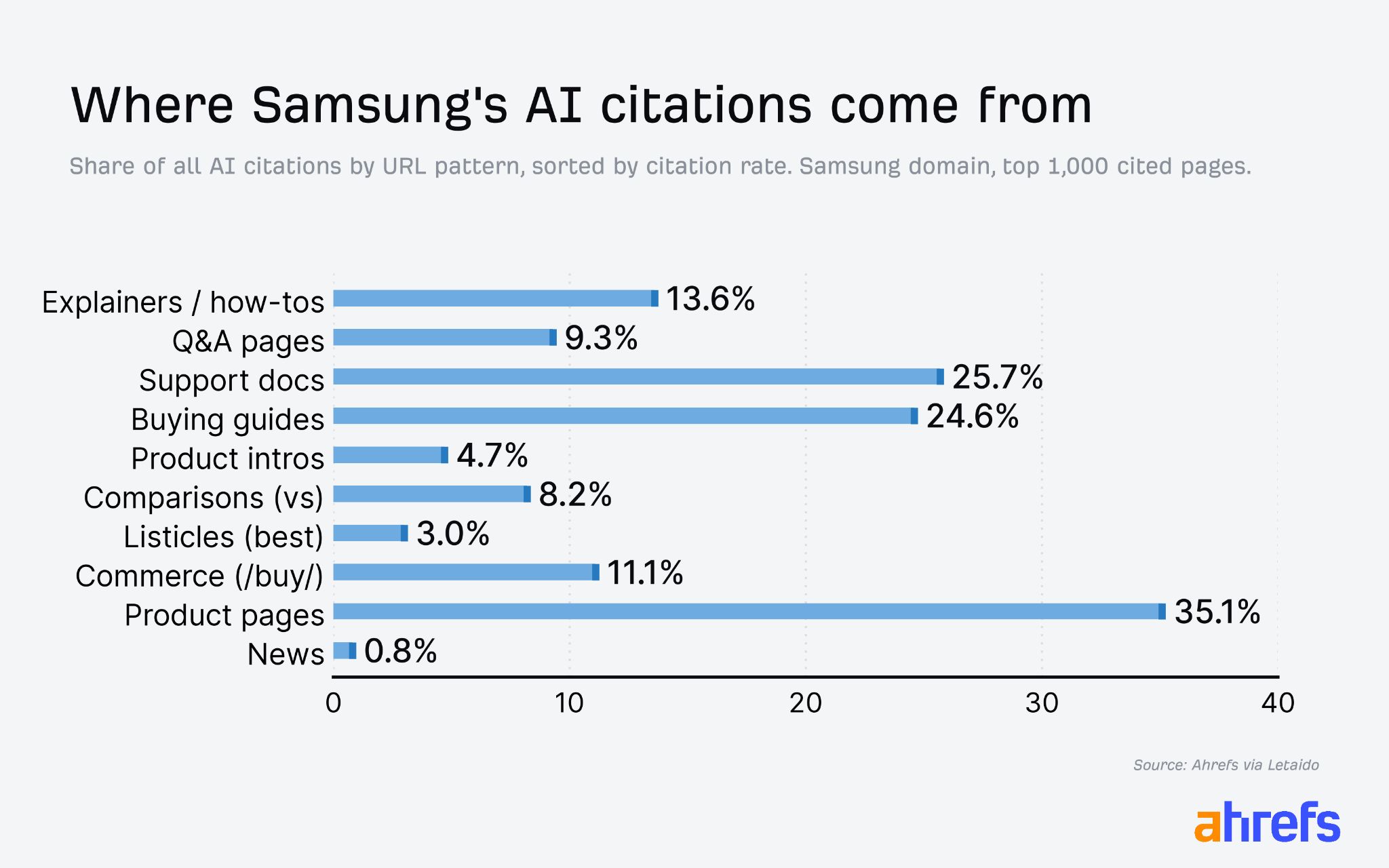
If you look at a big tech brand like Samsung, you’ll see that their most valuable pages look like something a Sales or Support rep could use when chatting with customers (product guides, support docs, FAQs, etc.). Documentation for features, integrations, pricing, use cases, and product terminology helps AI answer questions accurately, and that is its new role.
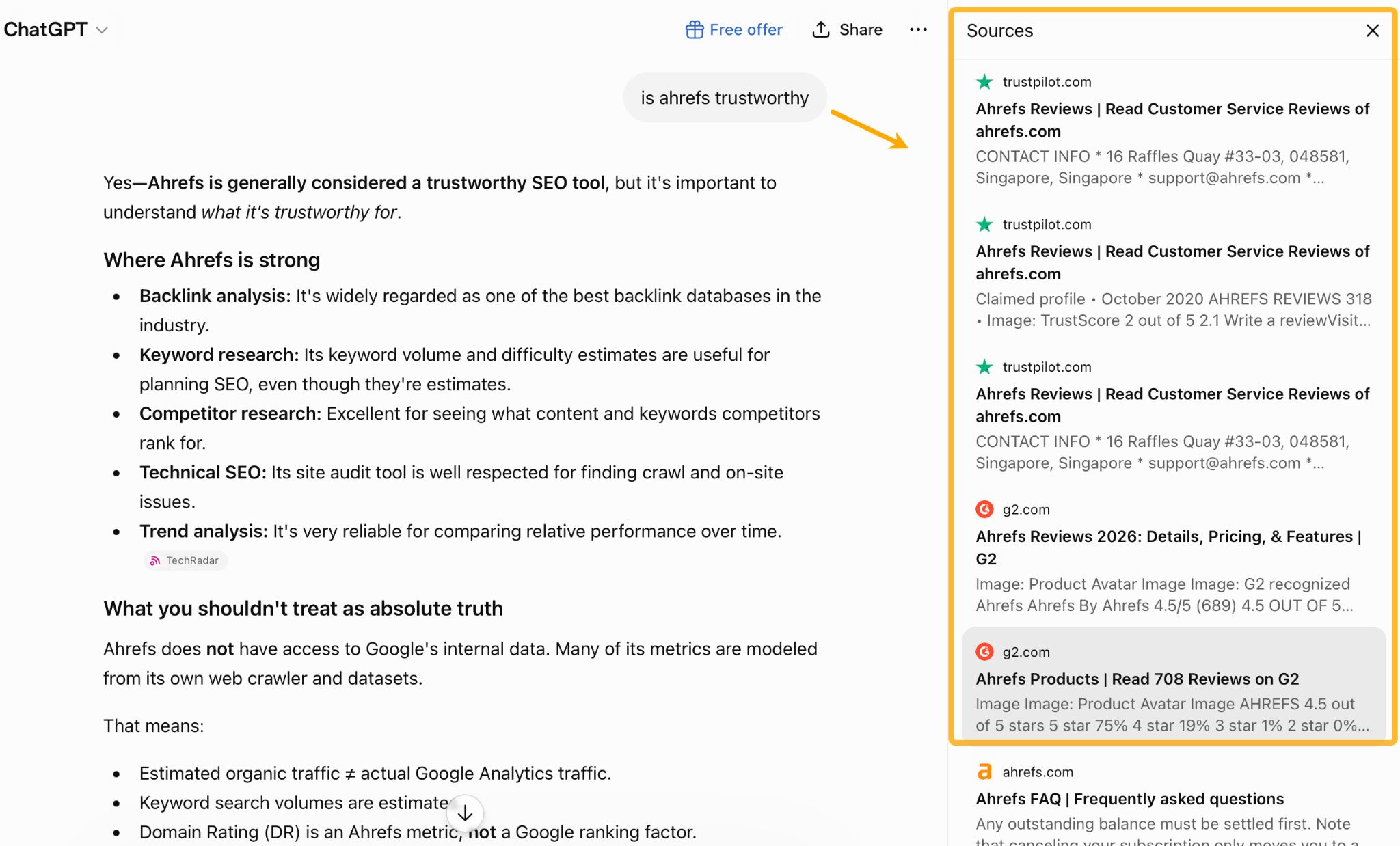
What’s more, your documentation extends beyond your website. It includes every profile you control on platforms like G2, Capterra, LinkedIn, Crunchbase, app marketplaces, and partner directories. AI assistants frequently use these pages, and they’re often the first place your messaging becomes outdated.
Do a quick test: take any brand and ask ChatGPT whether it’s trustworthy. I think you’ll find these sites influence the answer:
If you want to optimize for AI search, treat every owned profile as part of your source of truth. Keep your descriptions, positioning, pricing, and product details consistent everywhere.
Whenever possible, back up your claims with evidence—reviews, certifications, rankings, or awards. The more signals AI can cross-check, the more confident it can be in describing your business accurately.
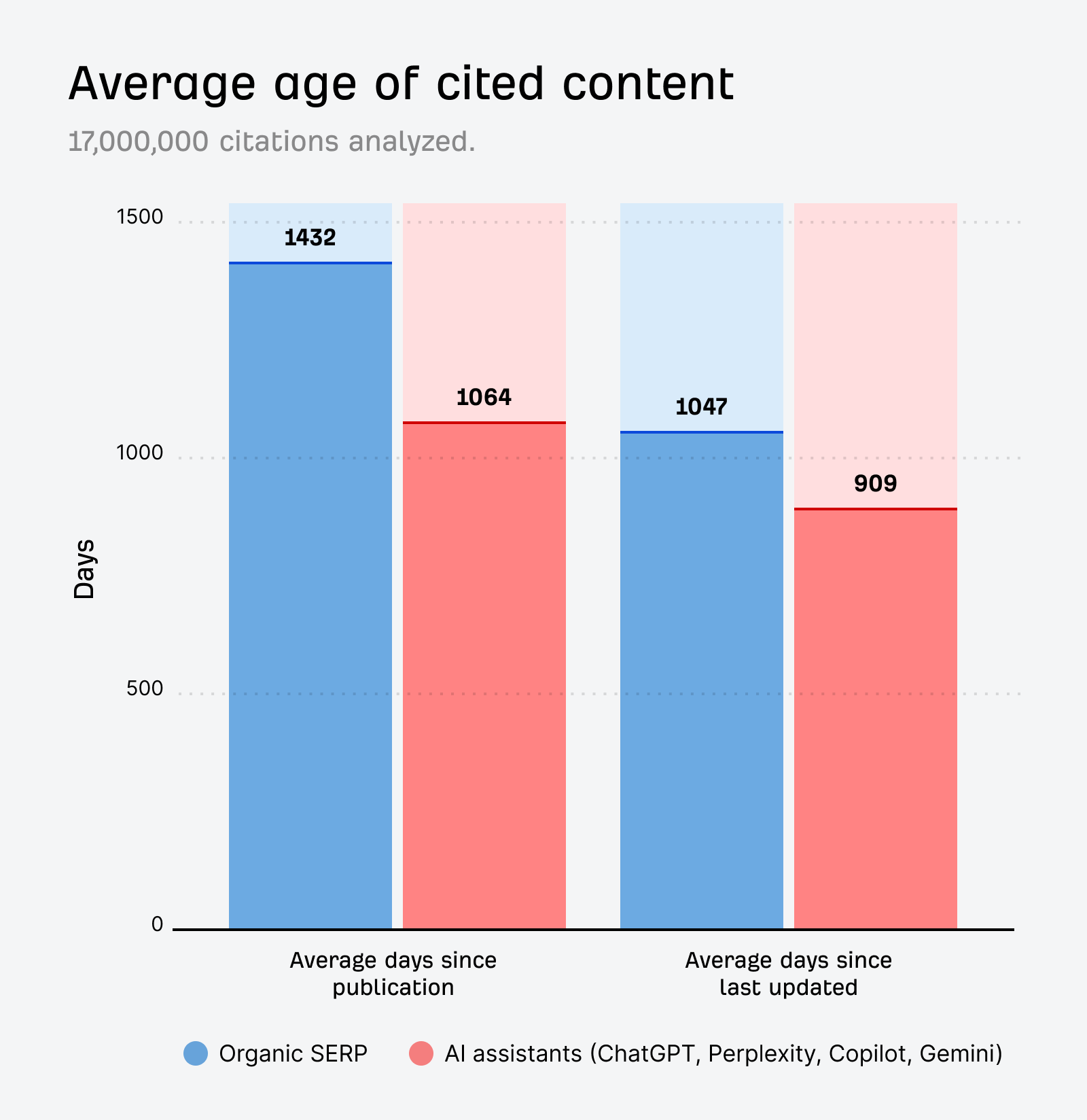
Don’t forget to keep your claims up to date. Our research found that AI assistants favor fresh information: AI-cited content is 25.7% fresher than organic Google results.
How to get started
Reviewing every page and profile you own can quickly become overwhelming. But you can uncover most issues with these three checks:
- Review the branded profiles you control (G2, LinkedIn, Google Business Profile, Facebook, YouTube, and others).
- Check whether your pages ranking for branded searches are accurate and up to date.
- Ask AI assistants specific questions about your brand and products to uncover gaps in your documentation.
The first one is fairly straightforward, so let’s focus on the other two.
You can see which of your pages AI cites, which ones AI bots visit, and when they were last updated with Ahrefs Brand Radar. Just create a report, enter your brand name and domain, open the Cited pages report, and switch to the Yours tab.
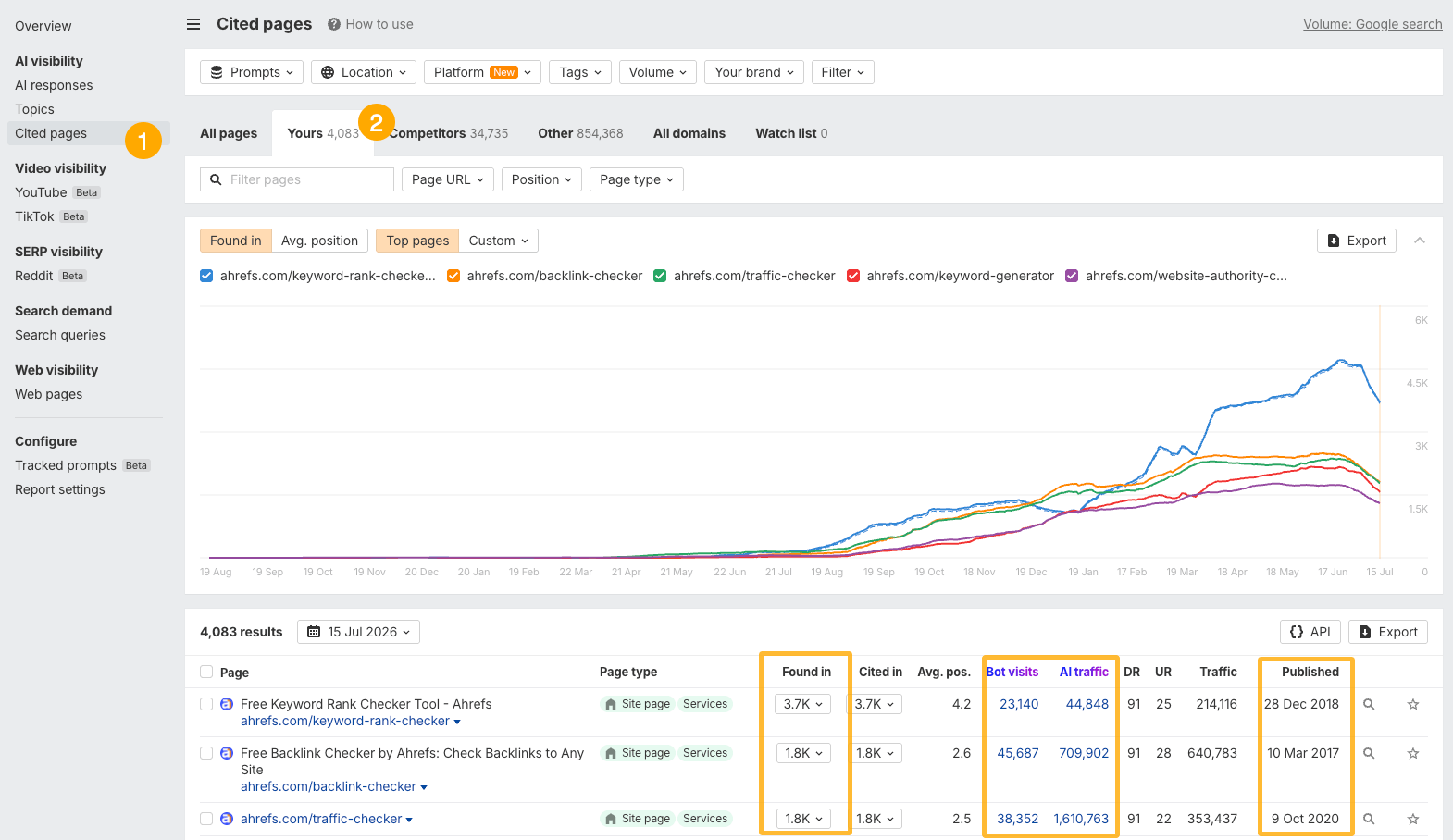
To see AI bot activity and AI search traffic, you’ll first need to set up Ahrefs Web Analytics (it’s free). Once data starts coming in, you’ll see Bot visits and AI traffic columns in the report.
Recommendation
If you want to analyze citation freshness across a large website, try the Letaido skill I built. It looks for signals that indicate when a page was published or last updated, making it easier to audit large, complex sites. It also includes filters designed specifically for this workflow.
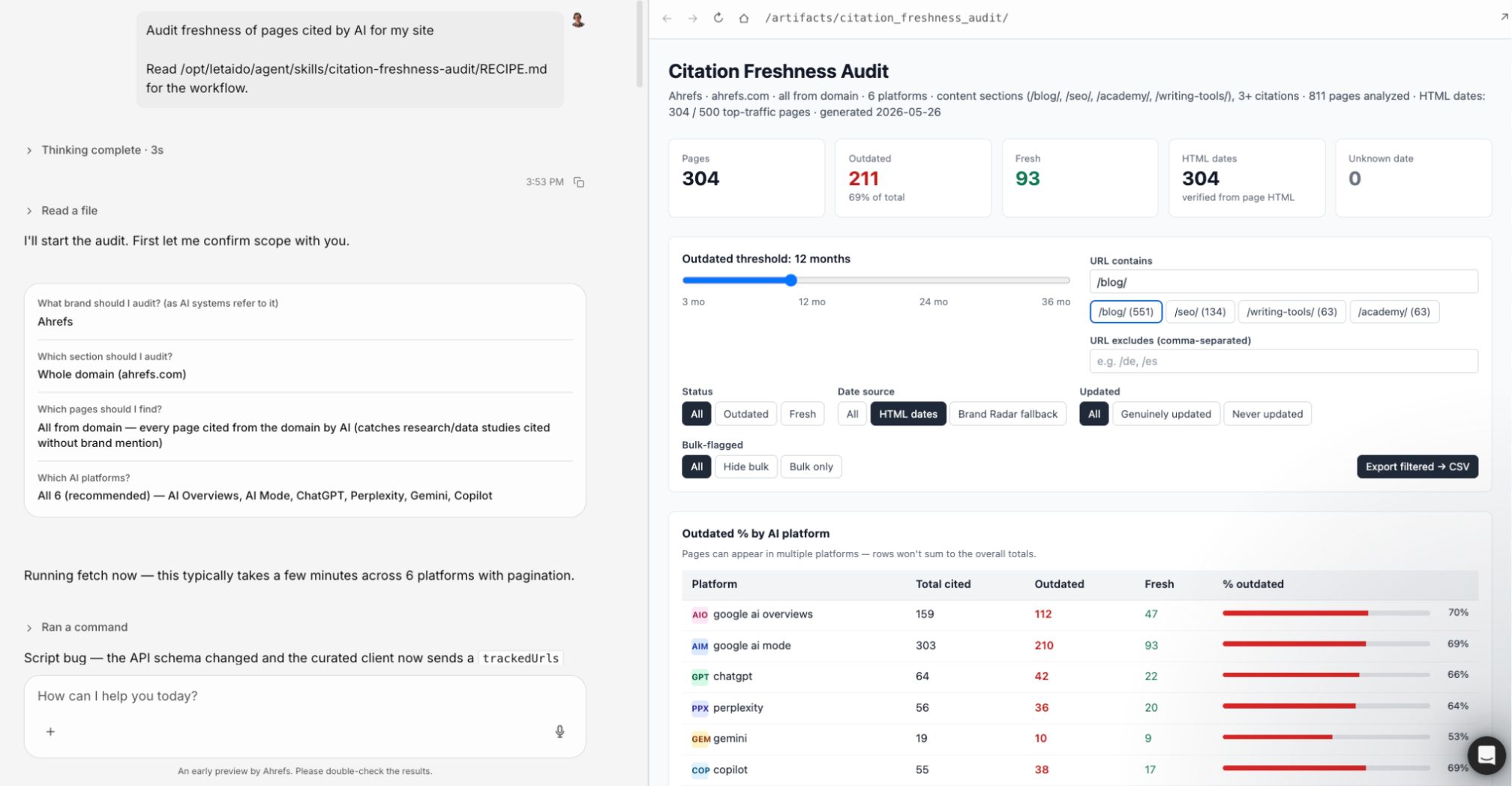
The third method is to ask AI assistants directly. You can do this manually in ChatGPT, Claude, Gemini, or any other major chatbot.
If you have an Ahrefs subscription, you can also automate this with custom prompts, so you can track answers over time without leaving Brand Radar.
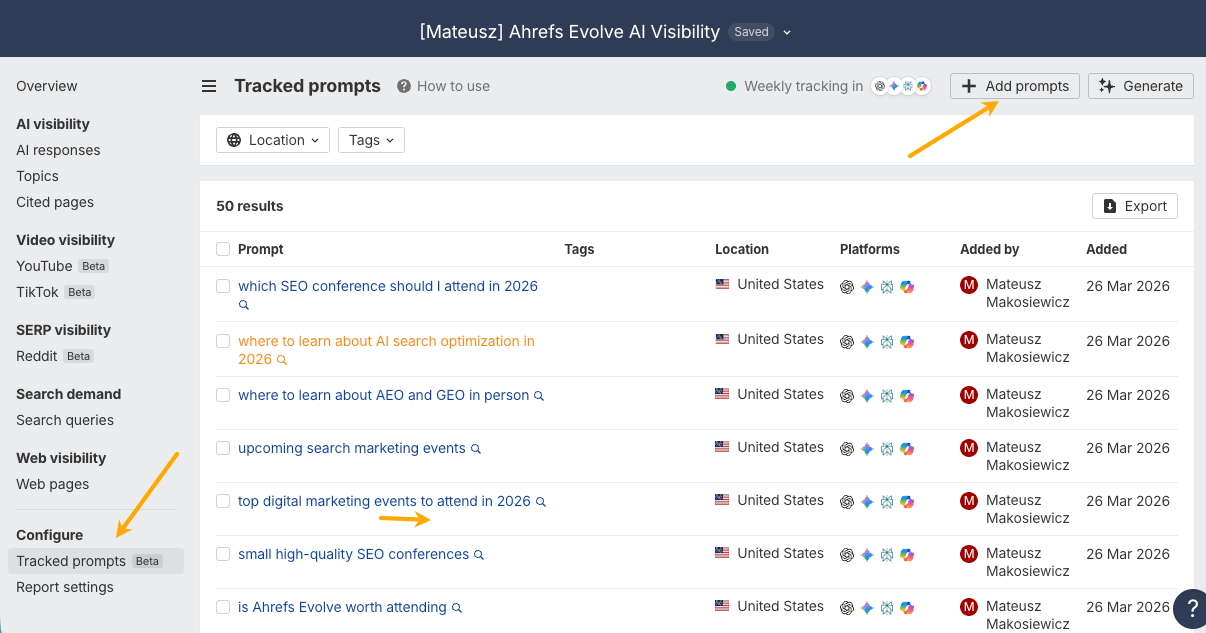
For example, on the Standard plan, you can track up to 37 custom prompts across ChatGPT and Gemini each week (or switch to daily tracking). This helps you distinguish one-off mistakes from recurring issues and see whether answers improve after you publish new content.
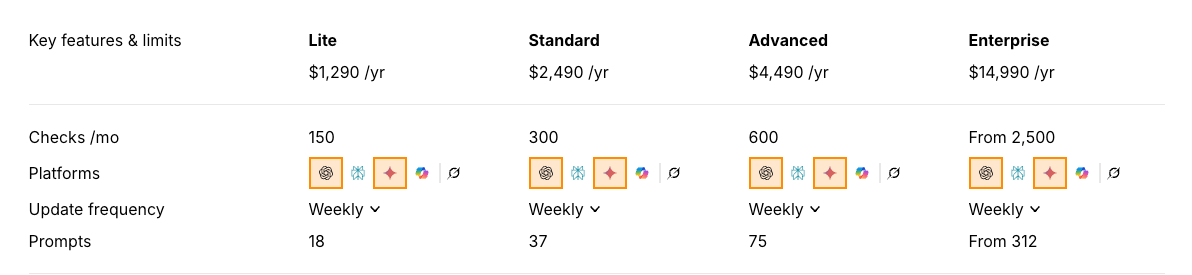
When setting up your prompts for tracking, think like a potential customer. Sales calls and support conversations are great sources of ideas.
AI can also help you brainstorm. Try asking something like:
What questions might someone ask ChatGPT while researching my product? Learn about my product first from [your domain].
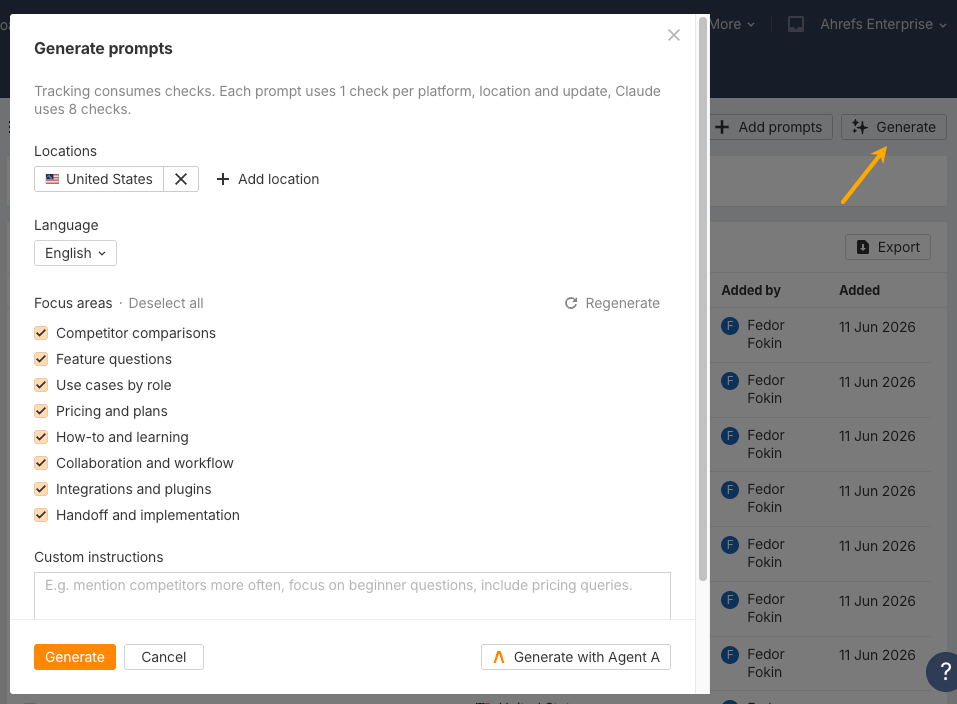
Or use the Generate prompts feature in Brand Radar to get started.
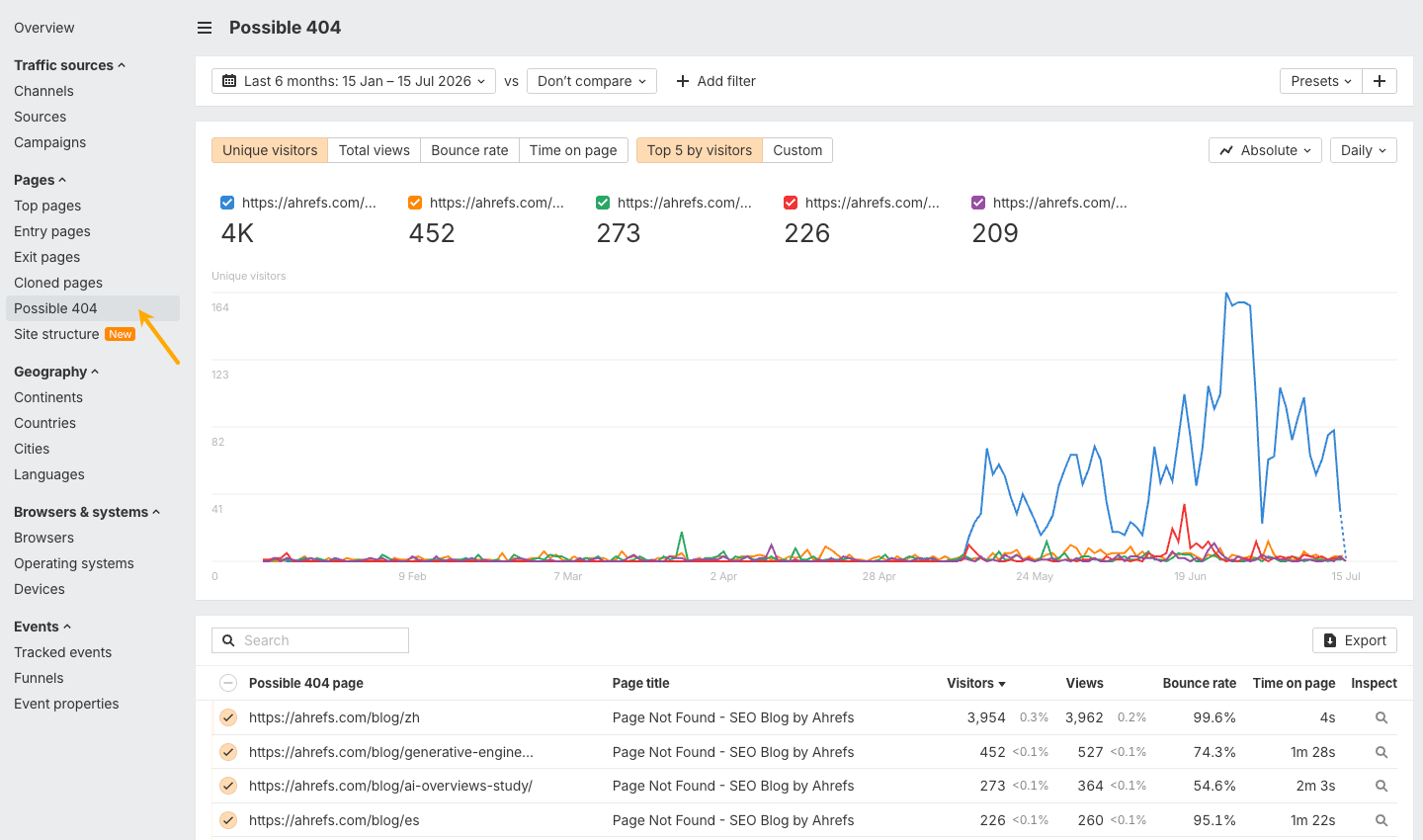
One more tip: pay attention to URLs that AI hallucinates. They often reveal pages that AI expects to exist but don’t. Those are good candidates for new redirects or even new content.
Further reading
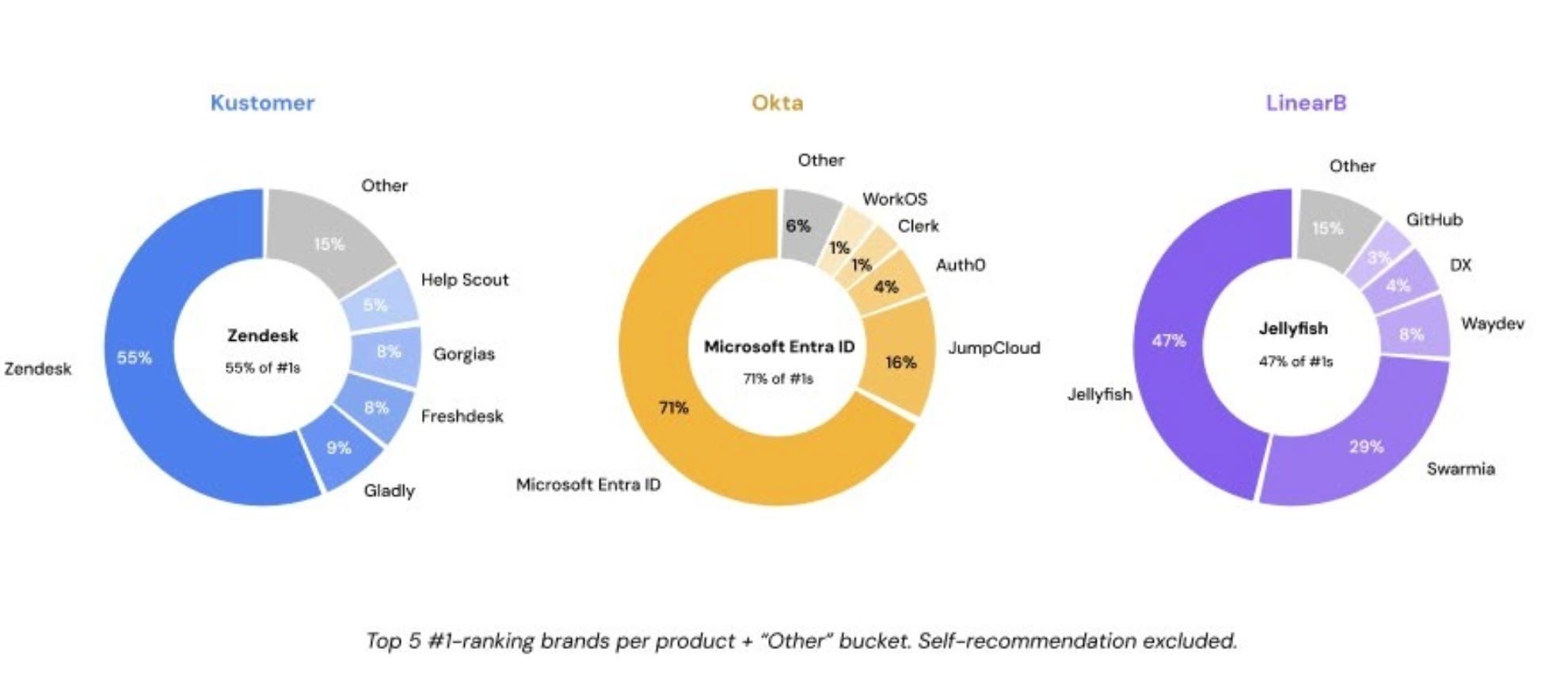
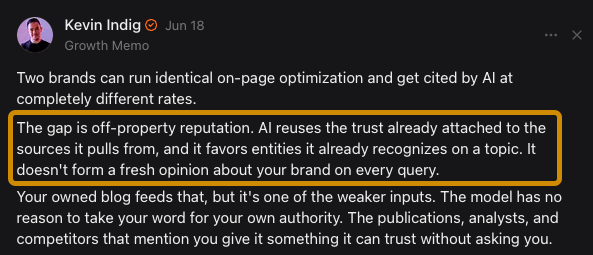
This also helps explain why similar pieces of content can produce very different results. One brand earns citations while another doesn’t—not because the content is dramatically better, but because AI has much more evidence that the first brand belongs in the conversation. J.H. Sherck and Kevin Indig have reported similar findings.
Moreover, our study of 75,000 brands found that off-site mentions, especially the ones from YouTube video transcripts, had some of the strongest correlations with visibility in ChatGPT, Google AI Mode, and Google AI Overviews.
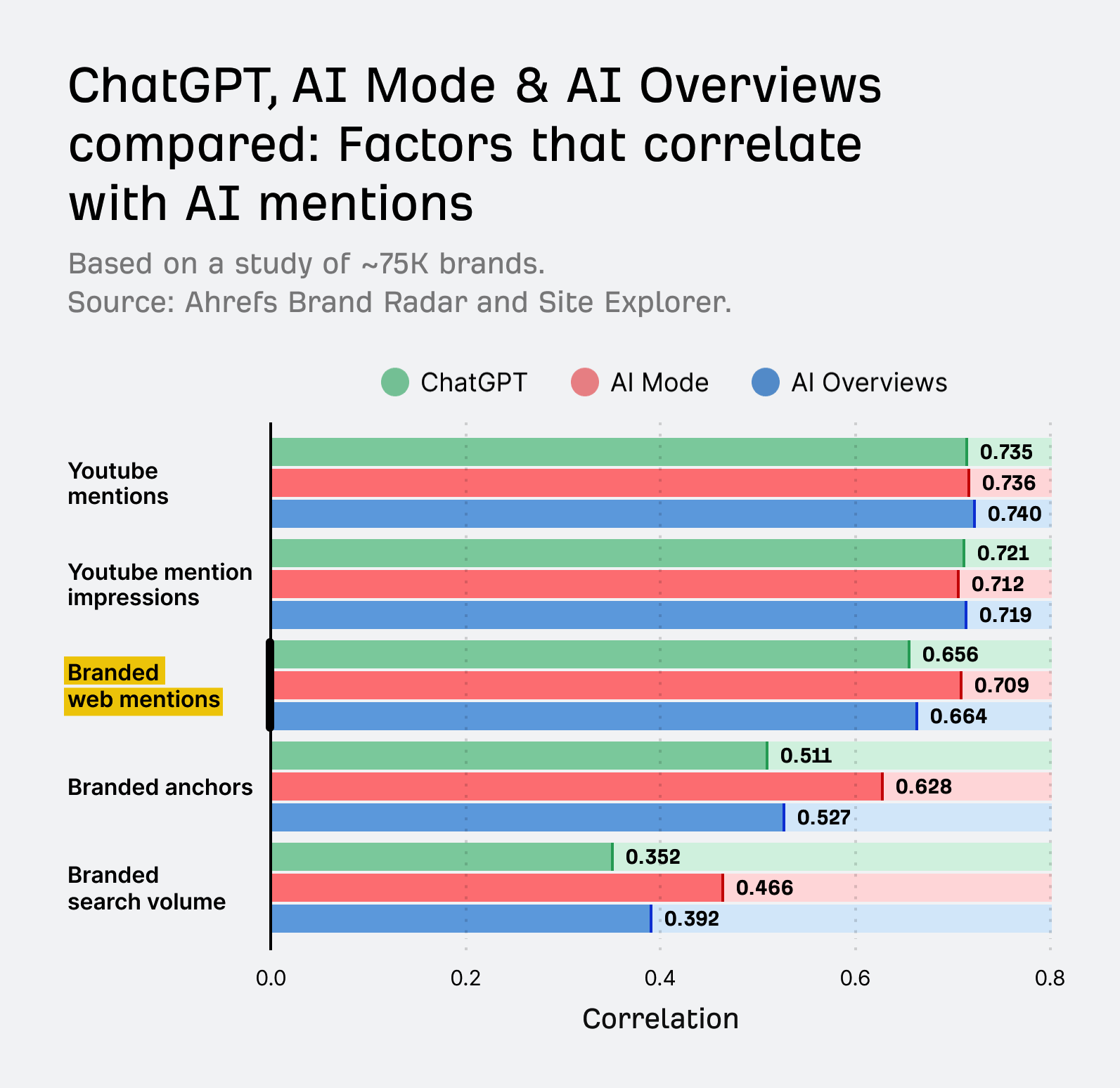
So before AI decides whether to recommend you, it first needs enough evidence to include you in the category at all.
The most useful mentions consistently connect your brand with:
- The right category—for example, “Ahrefs is an SEO platform,” not just “a popular tool”
- The problems you solve—“we used Ahrefs to figure out why our traffic dropped”
- The customers you serve—“a favorite among in-house SEO teams and agencies”
- The use cases you want to own—“the go-to for backlink analysis and keyword research”
- The competitors buyers compare you with—showing up in “Ahrefs vs. Semrush” comparisons, not against tools you’ve outgrown
This is why you need a source strategy, not just a content strategy.
Focus on places AI systems already use to generate the answers:
- User-generated content platforms, especially YouTube, Reddit, Facebook, and LinkedIn
- Industry publications and analyst sites
- G2, Capterra, and other review platforms
- Partner marketplaces and integration pages
- Third-party listicles and comparison pages
In the next section, I’ll show you how to check which exact pages influence the category in your case.
How to get started
Start by checking whether AI assistants already include your brand among the companies they regularly recommend in your category.
If they do, focus on protecting that position and making sure AI describes your business accurately.
If they don’t, you’ll need more third-party evidence that connects your brand with the category, the use cases you want to own, and the competitors you want to be compared against.
For example, if I wanted to check Ahrefs’ visibility in the SEO tools category, I’d create a Brand Radar report and enter “SEO tools” as the category.
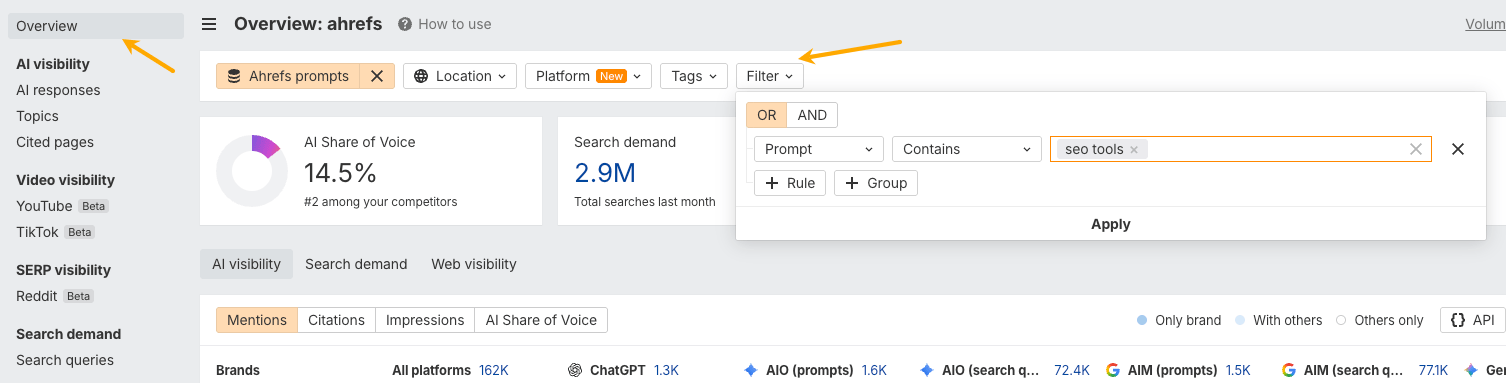
In that category, Ahrefs has an AI share of voice of 87%, making it highly likely we’ll be mentioned in conversations about SEO tools.
To find the gaps, I’d hover over the Ahrefs brand name in the AI visibility breakdown chart and select Others only.
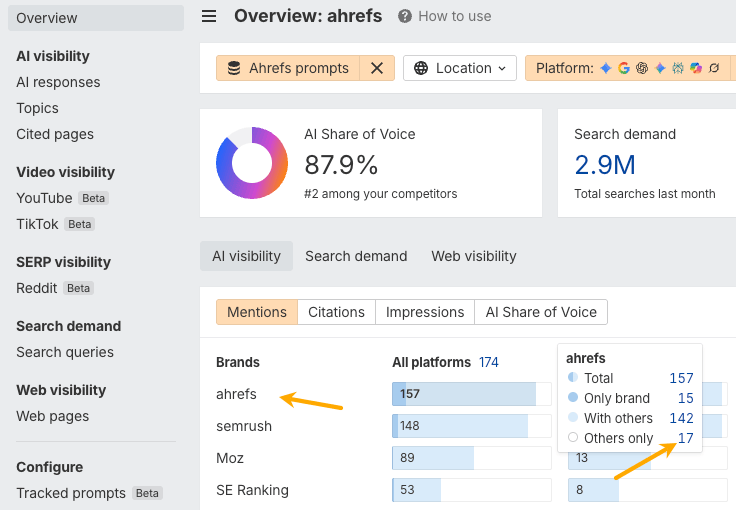
This filters the report to prompts where competitors were mentioned, but Ahrefs wasn’t.
For example, I can see that Ahrefs wasn’t mentioned in responses to “Which SEO tools are best for beginners?” in Google AI Mode and AI Overviews in the US.
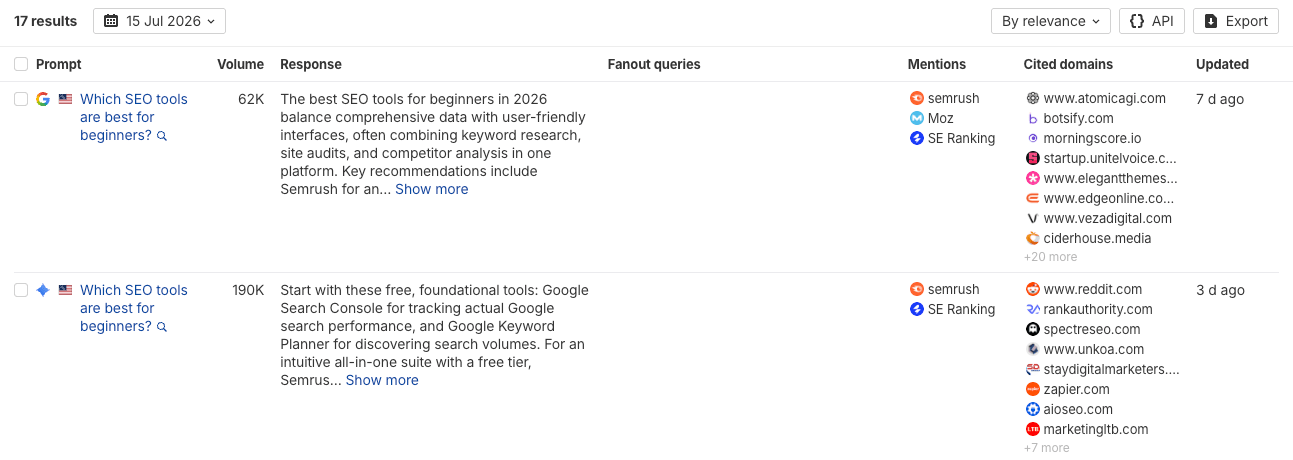
The next step is to understand why.
I’d open those AI answers, review the pages they cite, and look for opportunities to earn mentions on those sites. At the same time, I’d consider whether our own website should do a better job covering the topic. In this example, creating a page about why Ahrefs is a good choice for beginners could strengthen the evidence AI finds.
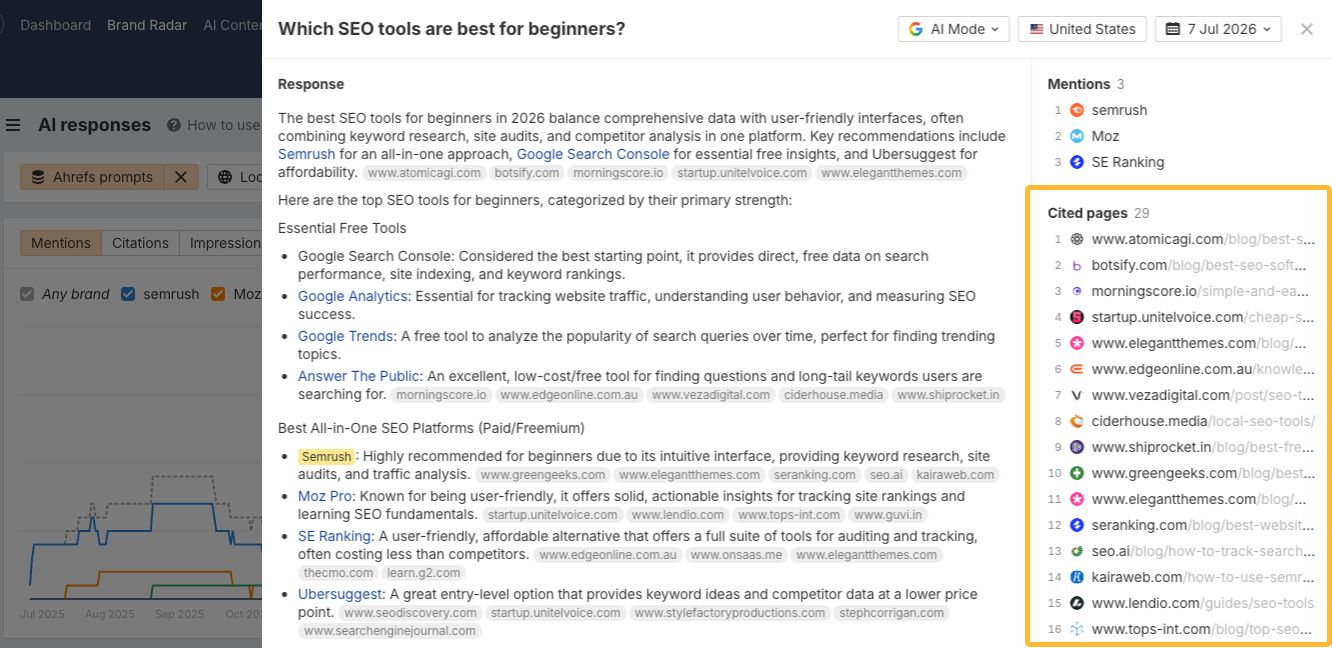
There’s also a faster way to identify these opportunities.
With the same filters applied, open the Cited pages report and look at the Mentions on page column.
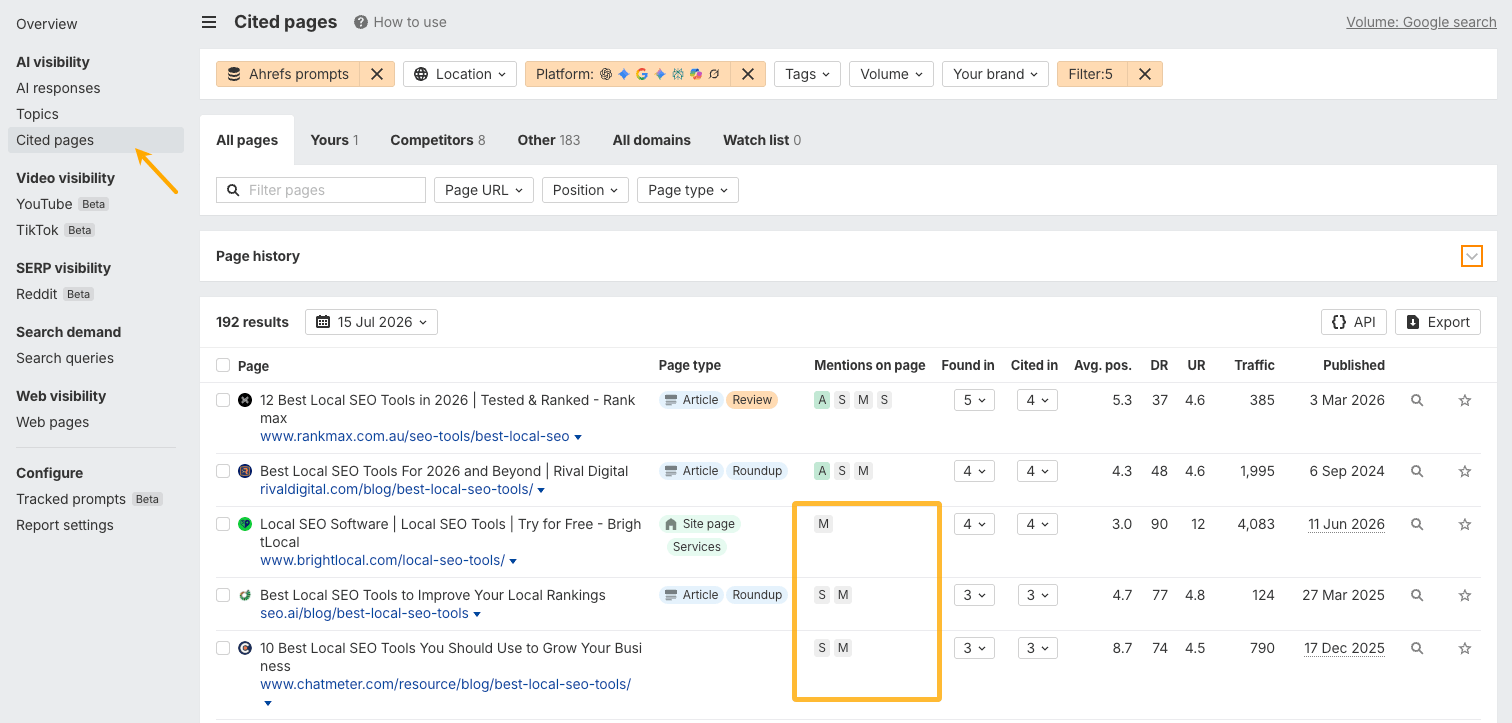
This gives you a list of pages that influence AI answers but don’t mention your brand.
Use it to prioritize outreach, partnerships, creator collaborations, reviews, and community participation. Focus on the sources that have the greatest influence on AI answers in your category.
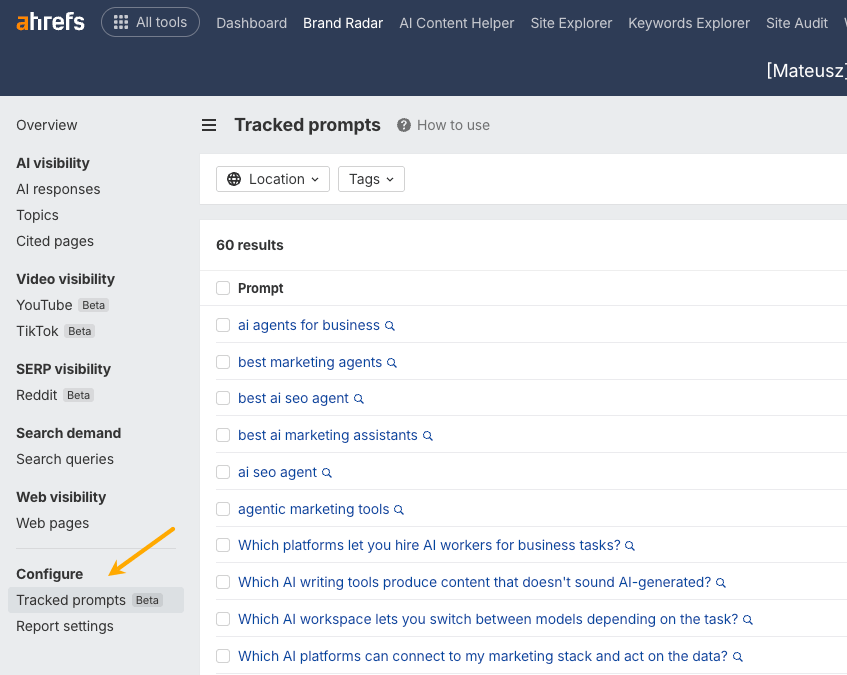
If you don’t see enough prompts related to your niche in the main AI Index, create your own with the Custom prompts feature.
That’s exactly what we’ve seen at Ahrefs. Thousands of AI citations come from our original research because it offers something AI can’t find elsewhere.
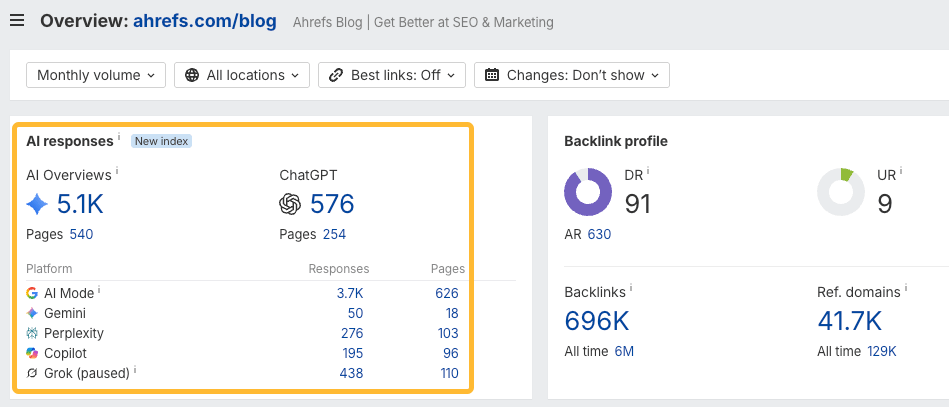
In fact, with content like that, AI can even encourage the user to visit the page for the full story.
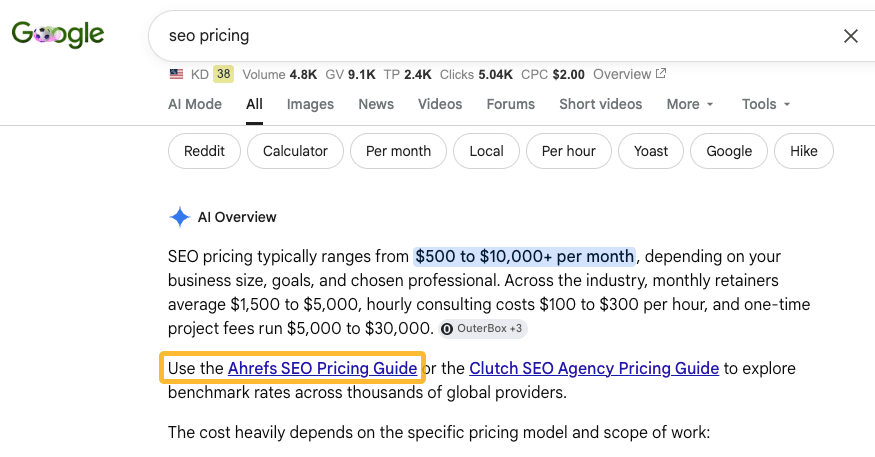
These are topics where AI can explain what to do, but not how to do it. Ask ChatGPT how to run a content audit, and you’ll get a solid outline, but the hard decisions are still yours to make.
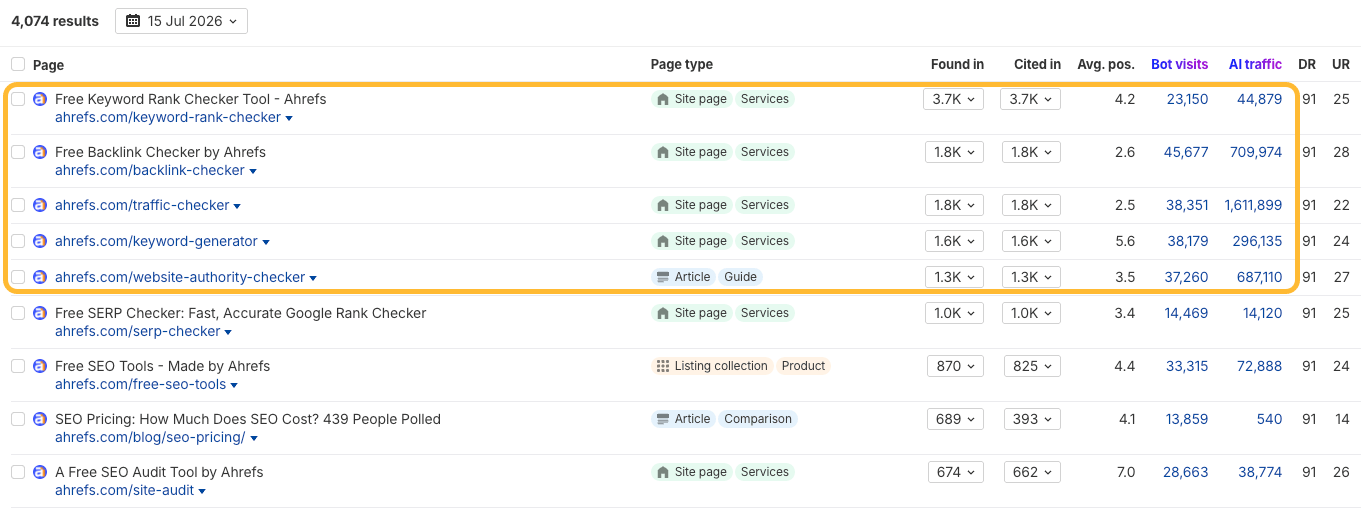
The same goes for online tools, calculators, and templates, and that’s our second category: content that resists AI summarization. AI can describe a backlink checker, but it can’t be one. That’s one reason many of these keywords don’t trigger AI Overviews.
At Ahrefs, these pages receive some of our highest levels of AI citations and traffic.
Recommendation
Content for AI search isn’t a separate investment.
The same content that earns AI citations—original research, firsthand experiments, unique perspectives, and exclusive data—is also the kind of content people share, journalists quote, podcasts discuss, and sales teams use.
It fuels your newsletter, gives you something worth posting on social media, supports sales conversations, and earns third-party mentions.
AI visibility is simply another benefit of creating content that’s worth publishing in the first place.
How to get started
Start with the citation gaps: topics where AI assistants cite your competitors but not you.
A citation gap is a demand signal. It tells you the topic already matters in your category—you just haven’t earned a place in the conversation yet.
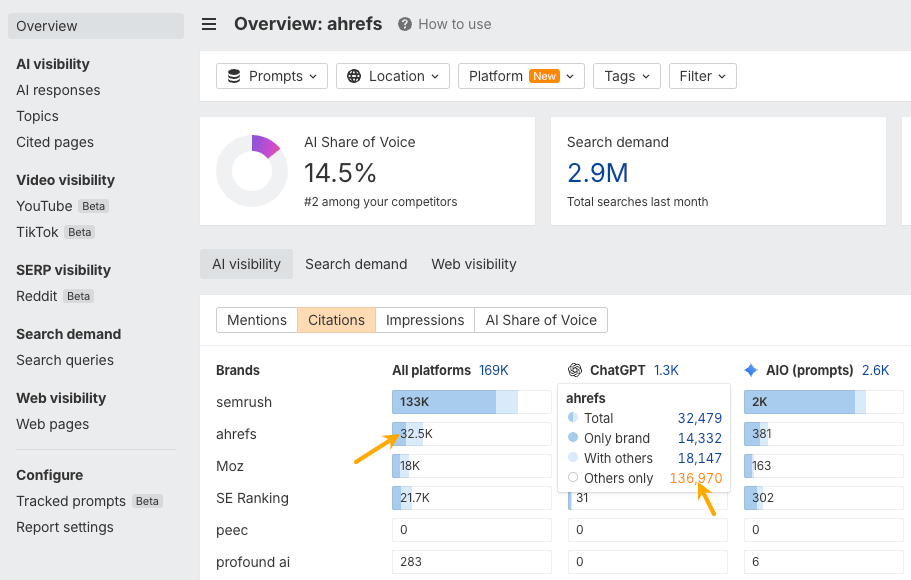
Here’s how I’d find those gaps in Brand Radar. In the Overview report, open the Citations tab, hover over your brand, and click Others only.
Next, open the Cited pages report. You’ll see pages AI already cites for those topics. Some may cover subjects you haven’t written about yet. Others may reveal pages on your site that could be improved.
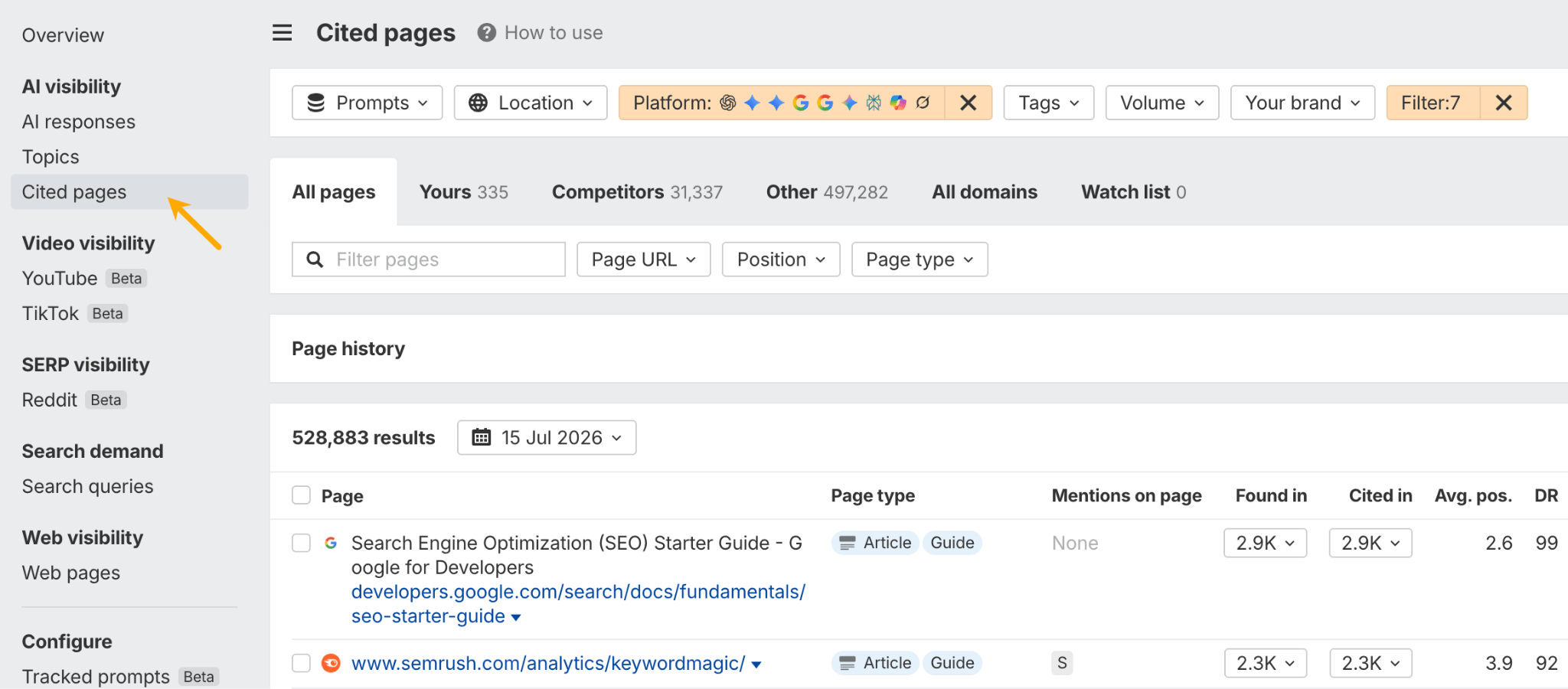
Use the Found in and Traffic columns to prioritize opportunities. Then check the Published column to see whether you can create something fresher than what’s already being cited.
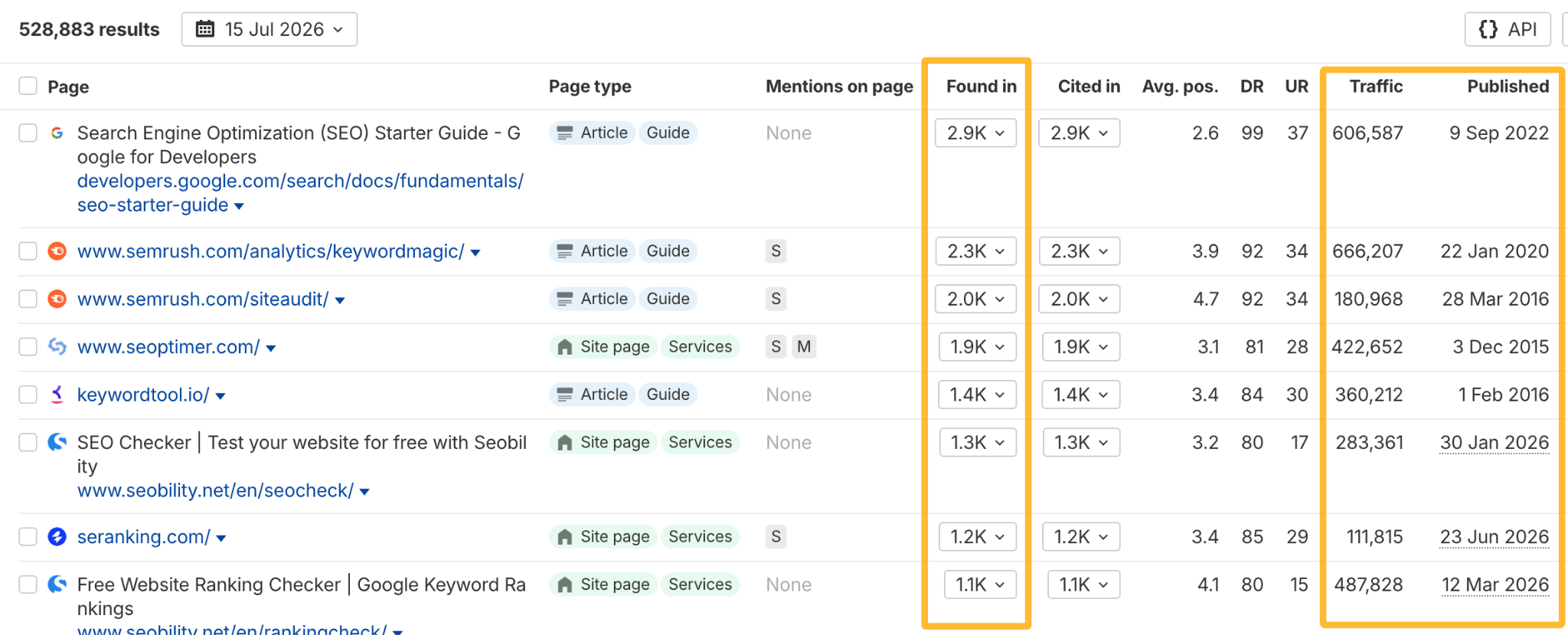
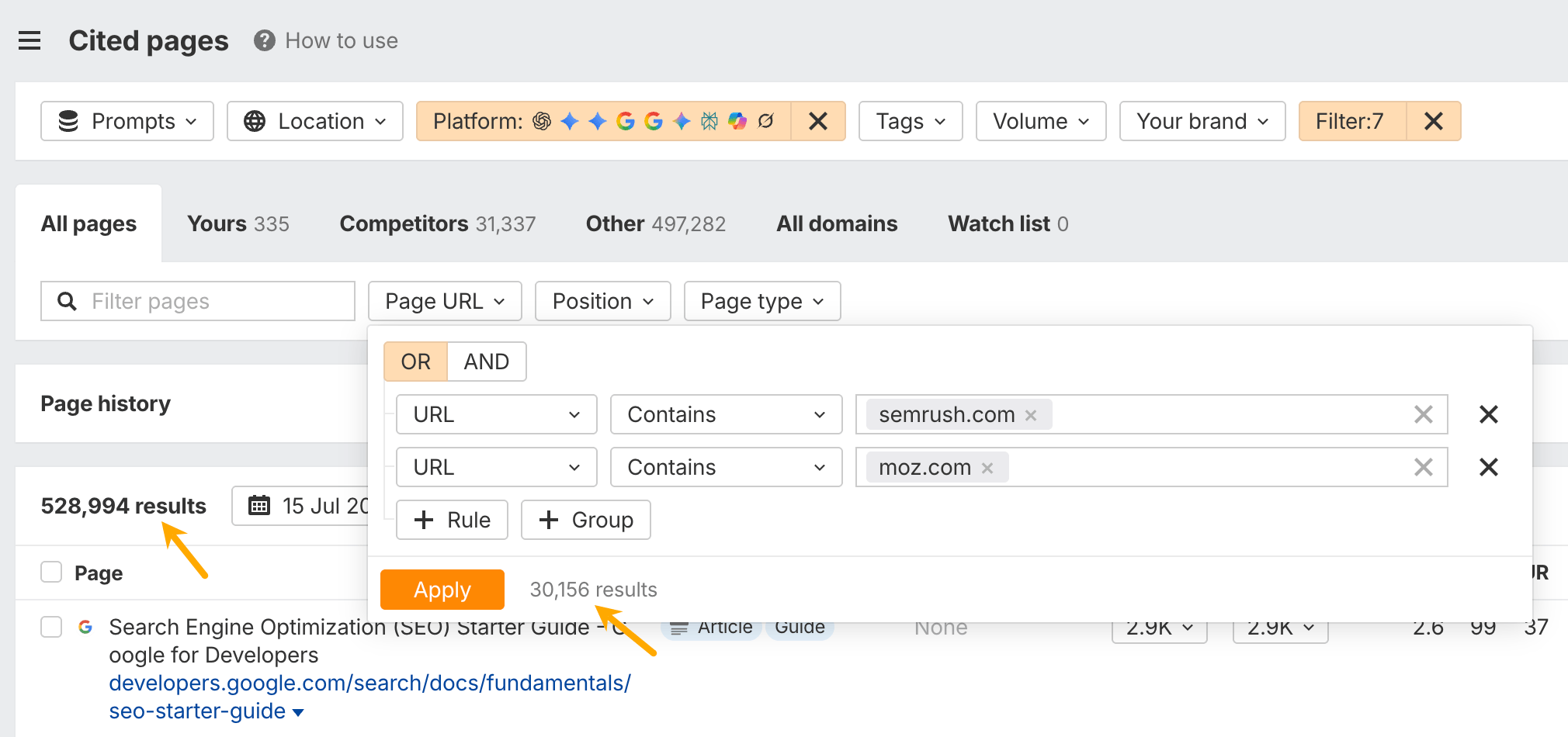
A useful trick is to filter the report to your closest competitors. If AI already cites them, there’s a good chance those are topics you should cover too.
The final step is to ask what you can contribute that nobody else can.
Look for places where a citation gap overlaps with something unique to your business: internal data, customer research, benchmarks, experiments, or firsthand experience. That’s where you’ll create the strongest content.
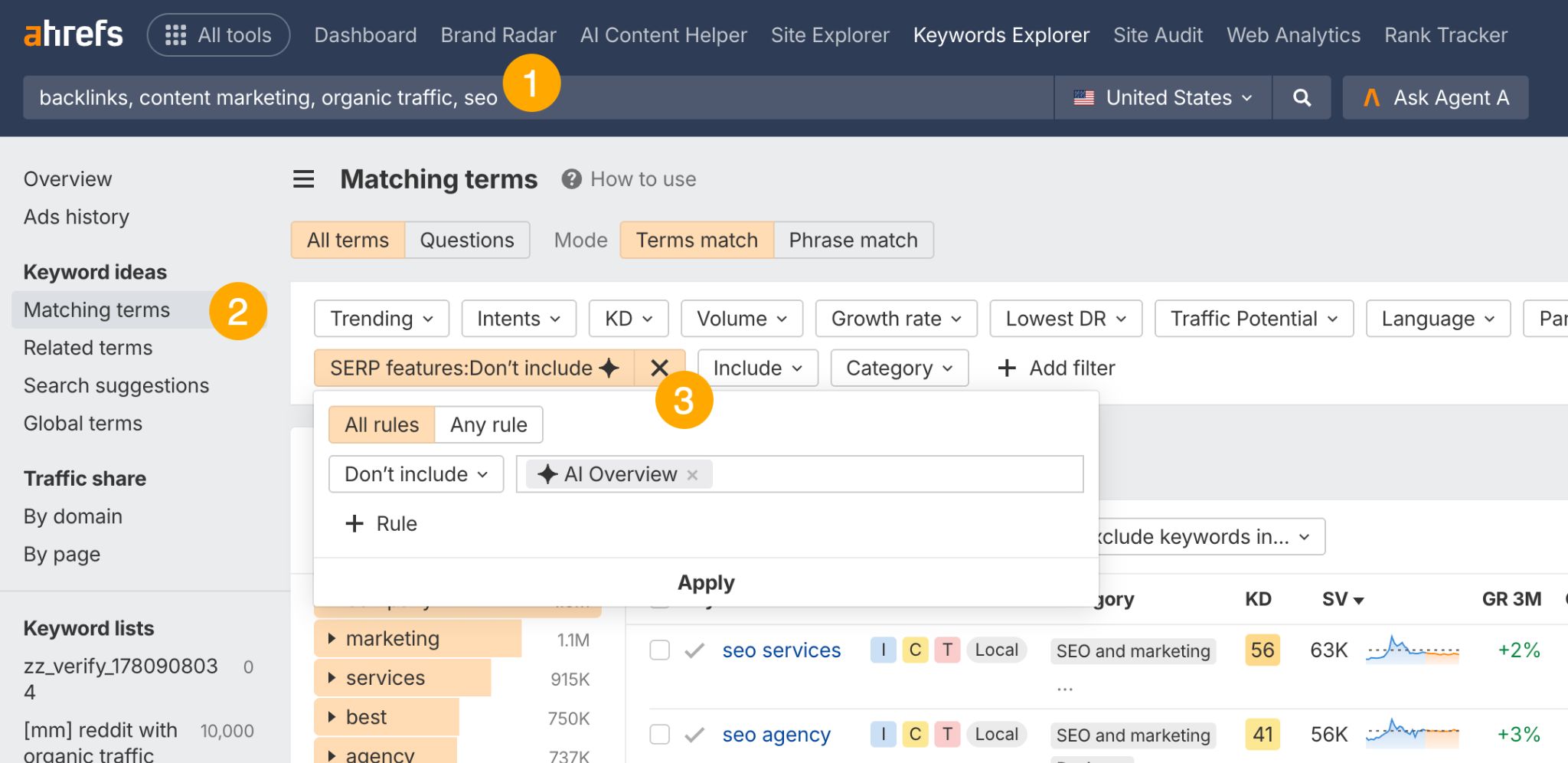
For content that resists summarization—like free tools, calculators, and templates—you need a keyword research tool like Ahrefs’ Keywords Explorer to show you where Google doesn’t show AI Overviews yet. Enter keywords related to your business, open the Matching terms report, and filter out keywords that trigger AI Overviews.
Further reading
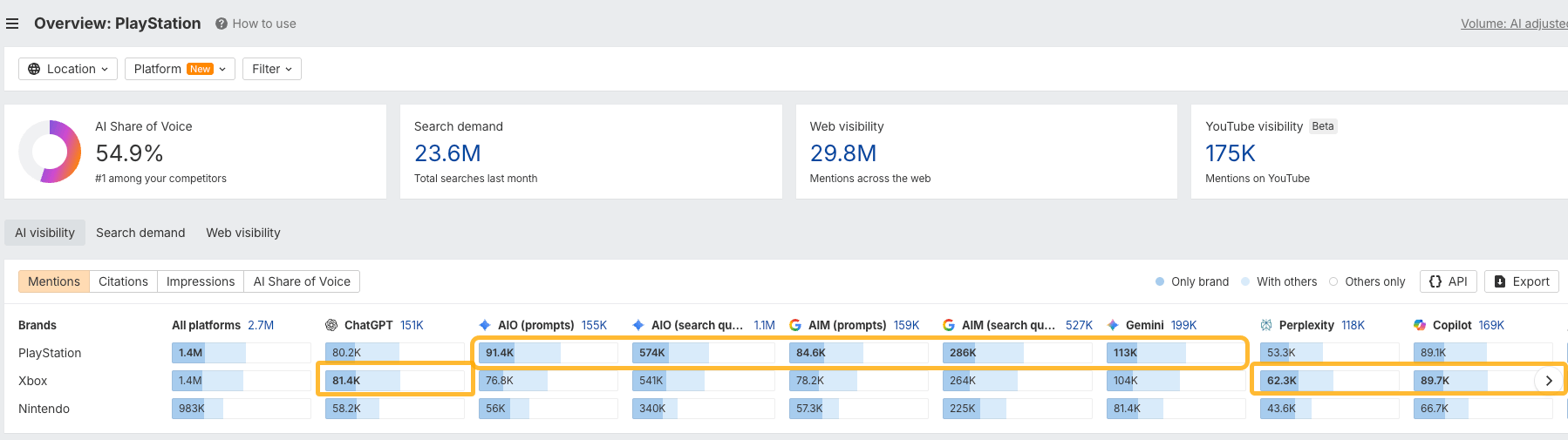
That means your brand might appear in one assistant’s answer and disappear from another’s. For instance, Xbox is mentioned more often than PlayStation in ChatGPT, Perplexity, and Copilot, but PlayStation is more popular across the entire Google ecosystem:
Instead of tracking individual responses, measure your visibility across many prompts and AI systems over time. Think of it more like a share of voice than search rankings.
What matters is your average presence across the questions, platforms, and buying scenarios your audience cares about.
How to get started
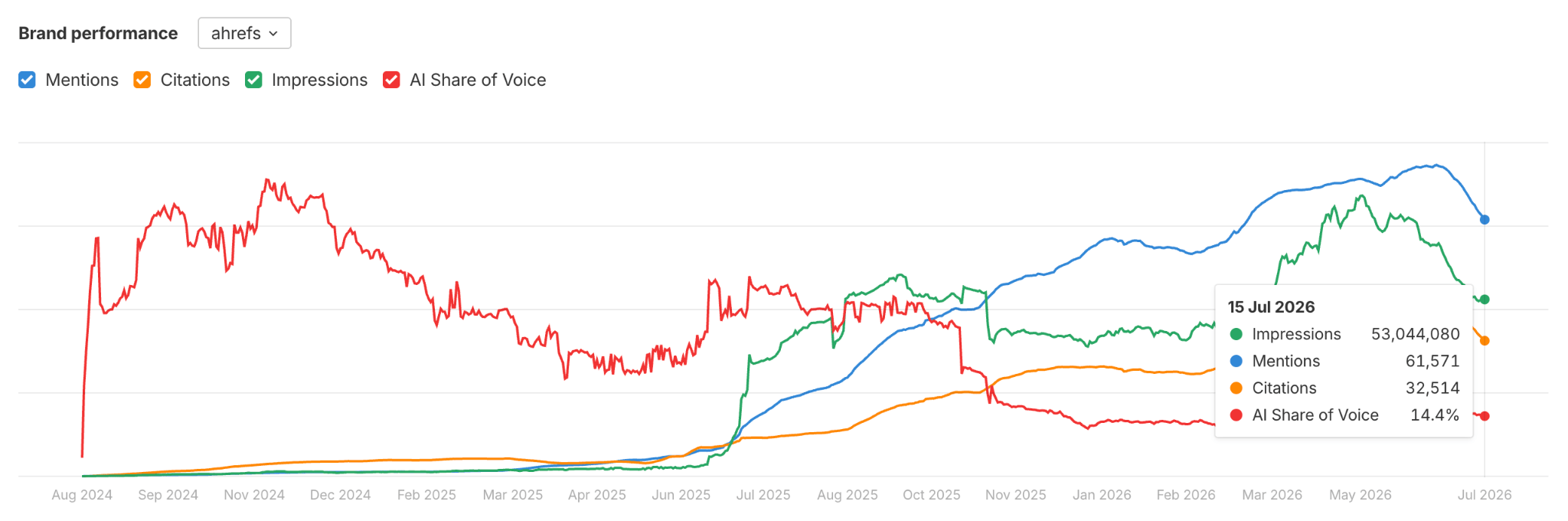
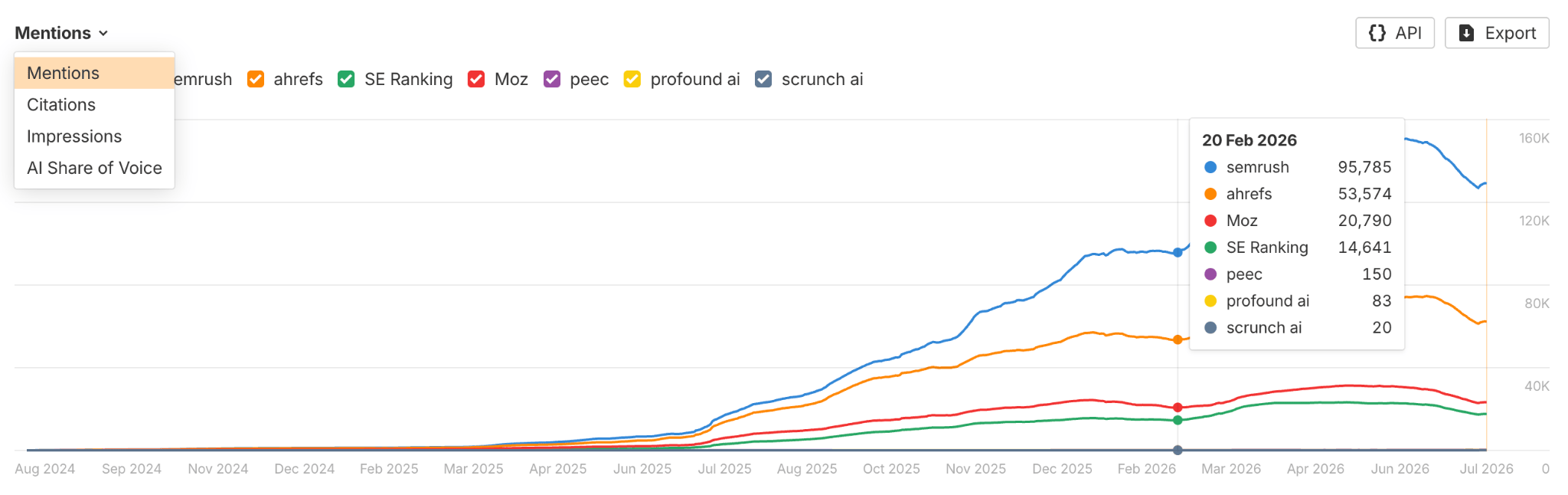
If you’re using Brand Radar, start by creating a report and adding your competitors. The Brand performance chart tracks your mentions, citations, AI share of voice, and estimated impressions over time, making it easy to see both your current performance and long-term trends.
The chart above it lets you compare those same metrics across competitors. You can switch between AI visibility metrics using the selector in the top-left corner.
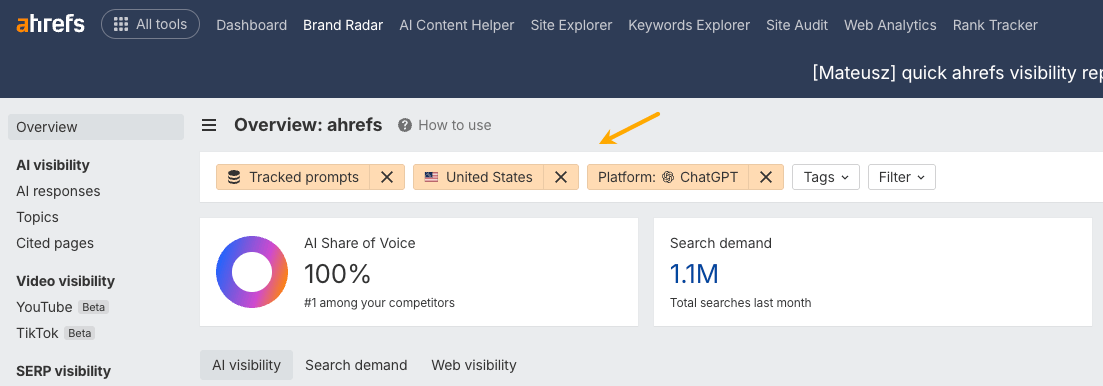
Use the upper filters to switch between prompt indexes, AI platform, and location.
Together, these reports answer four basic questions:
- How often is my brand mentioned?
- How often does AI cite my website?
- How many people are likely to see those mentions?
- How do I compare with my competitors?
That’s enough to establish a baseline and monitor your progress over time.
As you become more comfortable with these metrics, you can build a more specialized, custom dashboard. Here’s an example of one I’m building in Letaido for Letaido as a brand:
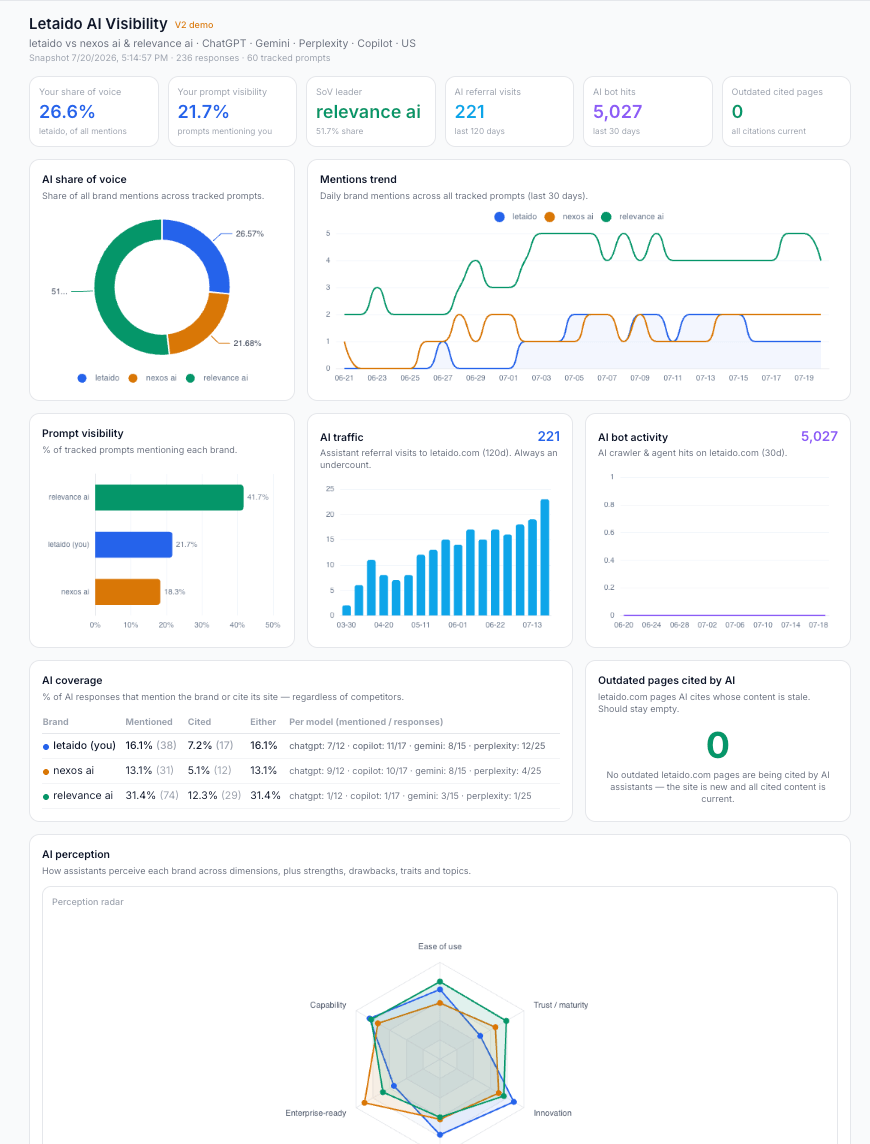
In addition to the core metrics, I track:
AI share of voice. The percentage of tracked prompts that mention your brand, compared against competitors. This is my quick-glance number for overall strategy. Coverage tells you how you’re doing in absolute terms; share of voice tells you whether you’re winning or losing the conversation.
AI traffic: Referral traffic from AI assistants. Helps to understand which content survives summarization and which pages people typically land after AI chats. I don’t treat it as the primary KPI: AI often influences journeys that analytics can’t fully attribute. Someone might discover your brand in ChatGPT, then return later through Google, a bookmark, or a direct visit.
AI bot activity. How often AI crawlers visit your site. Use this as a diagnostic metric. If new content isn’t being crawled, it’s unlikely to appear in AI answers. A sudden drop in crawler activity can also help explain why visibility isn’t improving as expected.
AI coverage. The percentage of tracked prompts that mention your brand or cite your website—split into mentions vs. citations, since being name-dropped and being linked are different wins.
If you publish original research, launch a PR campaign, or improve your documentation, coverage tells you whether those efforts actually increased your presence across the prompts that matter.
Also very useful for new brands and new niches, where it’s more important how often you show up at all, regardless of competitors.
AI perception. How AI consistently describes your business, scored across dimensions like ease of use, enterprise-readiness, and trust, alongside the adjectives, use cases, and strengths AI associates with the brand.
Over time, this reveals whether the market narrative is shifting in the direction you want, or whether AI has developed inaccurate or outdated associations that need to be corrected through better content or stronger third-party signals.
Outdated pages cited by AI. Pages AI assistants cite but whose content is stale: old pricing, deprecated features, pre-launch copy, etc. AI keeps quoting what it found, not what’s true today.
Recommendations. The “so what” layer. Prompts where competitors get cited and you don’t, topic segments where you’re absent entirely, and third-party pages that misrepresent your brand—each paired with a concrete action. Without this, an AI visibility dashboard is just monitoring; this is where it turns into a to-do list.
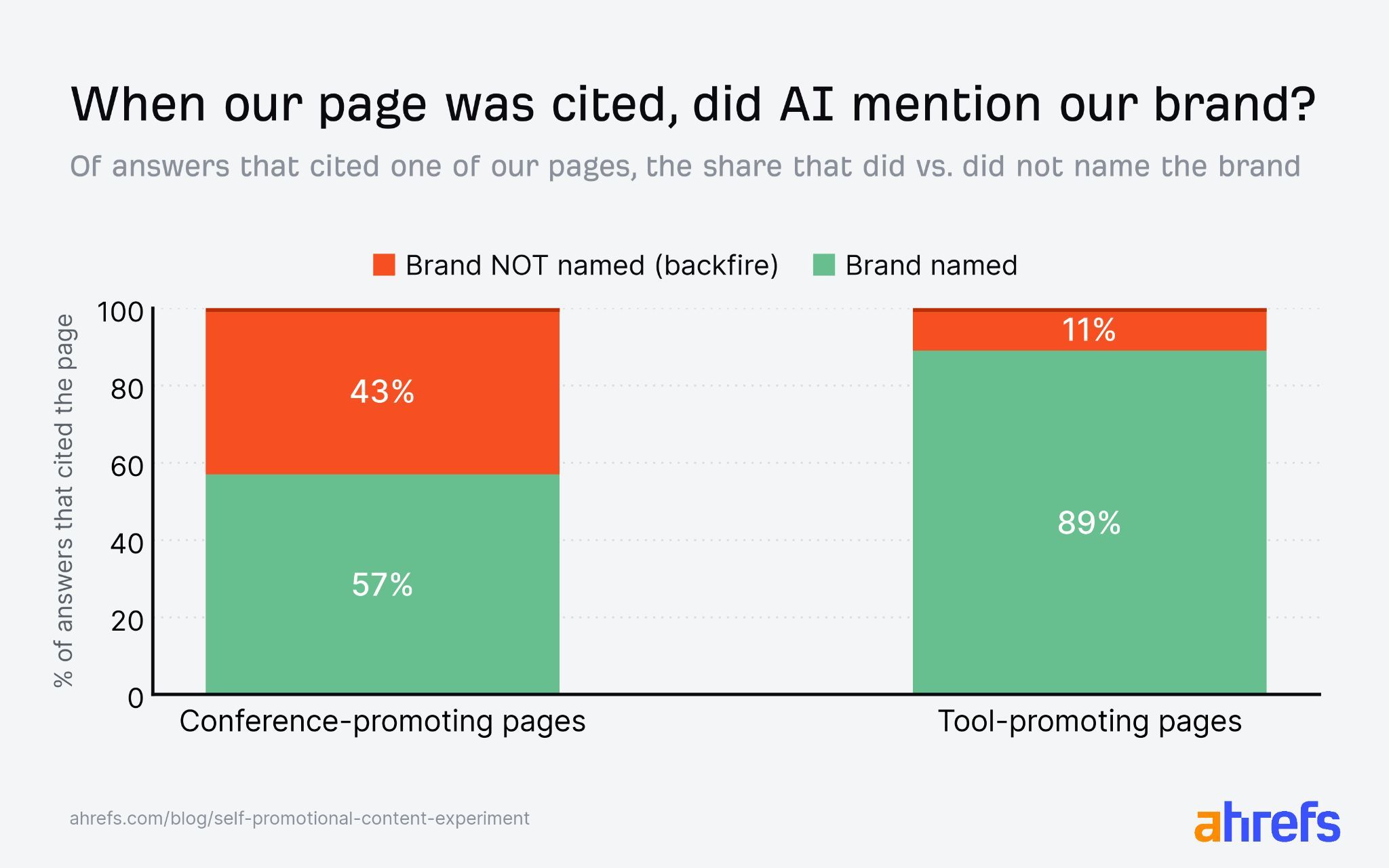
Product comparison pages can still work. Be transparent about your relationship to the products, explain who each tool is best for, and acknowledge where competitors are stronger. That makes the content more credible—for both readers and AI.
Large volumes of unreviewed AI-generated content (aka scaled content)
AI has made content cheaper to produce. It hasn’t made generic content more valuable.
Publishing hundreds of lightly reviewed pages often leads to repetitive content, weak research, and factual errors. It’s also one of the signals Google associates with scaled spam.
This often creates what’s become known as “Mount AI”: a rapid spike in organic traffic followed by an equally sharp decline.
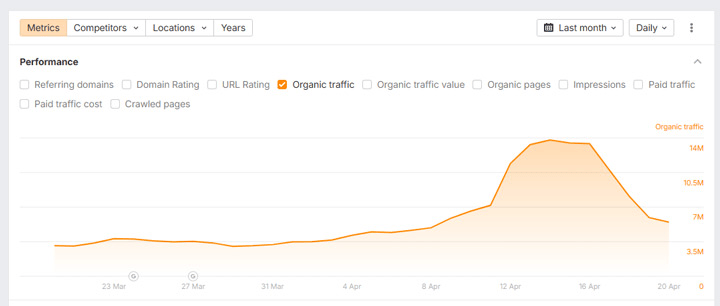
Glen Gabe and Lily Ray have documented several examples of AI-first content strategies that produced short-term gains before being hit by Google updates:
AI is great for research, analysis, outlining, and editing. It shouldn’t replace original ideas, firsthand experience, evidence, or human judgment.
Blocking AI crawlers (unless you have a really good reason)
Check your robots.txt file, firewall, and CDN settings for crawlers such as GPTBot, ClaudeBot, PerplexityBot, and Google-Extended.
There are valid reasons to block some of them, for example, publishers that license their content. Just make sure it’s a deliberate decision rather than an accidental configuration.
Similar Posts
Context-aware image generation for AI autoblogging plugins
For a long time, the relevance of images within articles has been one of the most…
Managed Hosting Firm 20i Debuts Embedded Hosting Assistant
UK-based managed hosting provider 20i has launched Twentie, a new embedded personal assistant designed to support everyday…
Step-by-Step Guide to Registering & Managing Your Domain
Choosing and managing a domain name is one of the first—and most important—steps in building an…
Eaton Launches AI Power Burst Detection to Protect Data Centers
Intelligent power management company Eaton has introduced what it calls an industry-first capability to detect and…
Vultr Adds AMD EPYC 4005 for Affordable, Scalable Cloud Solutions
Cloud infrastructure provider Vultr has announced the integration of AMD’s new EPYC 4005 Series processors into…
Celestial AI Secures $255M to Scale Optical Interconnects for AI
Celestial AI, a company specializing in optical interconnect technology designed for modern AI infrastructure, has secured…